<?xml version="1.0" encoding="utf-8"?>
<feed xmlns="http://www.w3.org/2005/Atom">
  <id>https://jclouds.apache.org/</id>
  <title><![CDATA[Apache jclouds]]></title>
  <link href="https://jclouds.apache.org/atom.xml" rel="self"/>
  <link href="https://jclouds.apache.org/"/>
  <generator uri="http://jekyllrb.com/">Jekyll</generator>

  
  <entry>
    <id>https://jclouds.apache.org/blog/2018/02/06/nova-neutron</id>
    <title type="html"><![CDATA[Introducing context linking & Neutron support for Nova]]></title>
    <link href="https://jclouds.apache.org/blog/2018/02/06/nova-neutron"/>
    <updated>2018-02-06T00:00:00Z</updated>
    <content type="html"><![CDATA[<p>One of the limitations of some jclouds APIs and Providers is that they are isolated libraries that cannot directly interact between them. There are scenarios where this would be desirable, such as letting OpenStack Nova (compute) use the OpenStack Neutron API (networking) to perform all networking related operations. There was no direct way to implement this in the jclouds APIs code, and users were left with the responsibility of invoking both APIs to have the desired behavior.</p>

<p>Apache jclouds 2.1.0 comes with a <strong>context linking</strong> feature, where APIs and providers that have dependencies between them can be <em>linked</em> so they can call each other where needed.</p>

<!-- more -->


<h2>Context Linking</h2>

<p>Linking one API or Provider to another is something that has to be defined in the API or Provider itself. It is a mechanism that allows users to inject an API or Provider <em>inside</em> a given jclouds context, so the API that <em>receives</em> the linked context can use it internally. Linking is not supposed to be used to link arbitrary APIs and Providers (that would have no effect), but APIs that are <em>prepared</em> to receive linked contexts and call its API methods.</p>

<p>For example, in jclouds 2.1.0, OpenStack Nova has been integrated with Neutron, and users will be able to link the <code>openstack-nova</code> context to an <code>openstack-neutron</code> one so the Nova API can use the Neutron features to manage all networking stuff. On the other hand, linking other APIs or providers together may have no effect, as the code for those APIs and providers may not expect any linked context. When thinking about linking two contexts together, please refer to the docs.</p>

<p>Linking is done at <em>context</em> level, and links are specified in the <em>using</em> context and point to the context(s) that it uses. This isolates each individual context and allows users to configure an independent set of properties for each one without overlapping issues. The <code>ContextLinking.linkContext</code> and <code>ContextLinking.linkView</code> helper methods can be used to easily link one context or view to another.</p>

<h2>Linking OpenStack Nova to Neutron</h2>

<p>The following example shows how to link an OpenStack Nova API to a Neutron API context, to leverage Neutron features when provisioning instances with Nova:</p>

<div class="highlight"><pre><code class="java"><span class="c1">// Create the connection to OpenStack Neutron</span>
<span class="n">ApiContext</span><span class="o">&lt;</span><span class="n">NeutronApi</span><span class="o">&gt;</span> <span class="n">neutronCtx</span> <span class="o">=</span> <span class="n">ContextBuilder</span><span class="o">.</span><span class="na">newBuilder</span><span class="o">(</span><span class="s">&quot;openstack-neutron&quot;</span><span class="o">)</span>
   <span class="o">.</span><span class="na">endpoint</span><span class="o">(</span><span class="s">&quot;http://localhost/identity/v3/&quot;</span><span class="o">)</span>
   <span class="o">.</span><span class="na">credentials</span><span class="o">(</span><span class="s">&quot;domain:user&quot;</span><span class="o">,</span> <span class="s">&quot;password&quot;</span><span class="o">)</span>
   <span class="o">.</span><span class="na">overrides</span><span class="o">(</span><span class="n">neutronProperties</span><span class="o">)</span>
   <span class="o">.</span><span class="na">modules</span><span class="o">(</span><span class="n">ImmutableSet</span><span class="o">.</span><span class="na">of</span><span class="o">(</span><span class="k">new</span> <span class="n">SLF4JLoggingModule</span><span class="o">()))</span>
   <span class="o">.</span><span class="na">build</span><span class="o">();</span>

<span class="c1">// Create the connection to OpenStack nova and link it to Neutron</span>
<span class="n">NovaApi</span> <span class="n">nova</span> <span class="o">=</span> <span class="n">ContextBuilder</span><span class="o">.</span><span class="na">newBuilder</span><span class="o">(</span><span class="s">&quot;openstack-nova&quot;</span><span class="o">)</span>
   <span class="o">.</span><span class="na">endpoint</span><span class="o">(</span><span class="s">&quot;http://localhost/identity/v3/&quot;</span><span class="o">)</span>
   <span class="o">.</span><span class="na">credentials</span><span class="o">(</span><span class="s">&quot;domain:user&quot;</span><span class="o">,</span> <span class="s">&quot;password&quot;</span><span class="o">)</span>
   <span class="o">.</span><span class="na">overrides</span><span class="o">(</span><span class="n">novaProperties</span><span class="o">)</span>
   <span class="o">.</span><span class="na">modules</span><span class="o">(</span><span class="n">ImmutableSet</span><span class="o">.</span><span class="na">of</span><span class="o">(</span>
               <span class="n">ContextLinking</span><span class="o">.</span><span class="na">linkContext</span><span class="o">(</span><span class="n">neutronCtx</span><span class="o">),</span>
               <span class="k">new</span> <span class="nf">SLF4JLoggingModule</span><span class="o">()))</span>
   <span class="o">.</span><span class="na">buildApi</span><span class="o">(</span><span class="n">NovaApi</span><span class="o">.</span><span class="na">class</span><span class="o">);</span>
</code></pre></div>


<p>With this configuration the <code>nova</code> API is configured to use the linked <code>neutron</code> for all networking operations.</p>

<h2>Writing code that accepts a linked context</h2>

<p>When writing an API or Provider that needs to use another jclouds API, you can easily leverage the context linking feature by injecting the target API as follows:</p>

<div class="highlight"><pre><code class="java"><span class="nd">@Inject</span><span class="o">(</span><span class="n">optional</span> <span class="o">=</span> <span class="kc">true</span><span class="o">)</span>
<span class="nd">@Named</span><span class="o">(</span><span class="s">&quot;openstack-neutron&quot;</span><span class="o">)</span>
<span class="kd">private</span> <span class="n">Supplier</span><span class="o">&lt;</span><span class="n">Context</span><span class="o">&gt;</span> <span class="n">neutronContextSupplier</span><span class="o">;</span>
</code></pre></div>


<ul>
<li>You must use the <strong>Provider or API id</strong> in the <code>@Named</code> annotation.</li>
<li>If the linked context is optional you can declare an optional injection.</li>
</ul>


<p>Then you can access the portble abstraction view or provider-specific API from the injected context.</p>
]]></content>
  </entry>
  
  <entry>
    <id>https://jclouds.apache.org/blog/2018/01/16/keystone-v3</id>
    <title type="html"><![CDATA[OpenStack Keystone V3 Support]]></title>
    <link href="https://jclouds.apache.org/blog/2018/01/16/keystone-v3"/>
    <updated>2018-01-16T00:00:00Z</updated>
    <content type="html"><![CDATA[<p>In the last few months, the jclouds community has been working hard on adding support for <strong>OpenStack Keystone V3</strong>. This has not been easy, as all the existing OpenStack APIs depend on it and we try hard to keep our APIs backwards-compatible. We wanted a clean solution that allowed users to upgrade with minimal changes required to existing code.</p>

<p>After lots of work, we're finally there and are very happy to announce that, starting from the upcoming <code>2.1.0</code> release, jclouds will also support version 3 of the OpenStack Keystone API!</p>

<!--more-->


<p>No new dependencies will be required to use the OpenStack Keystone V3 API: <code>openstack-keystone</code> contains the code for both V2 and V3, so all jclouds providers and APIs can support both versions.</p>

<h1>Configuring OpenStack services to use Keystone V3</h1>

<p>Configuring OpenStack services to use Keystone V3 is pretty straightforward. Just create your jclouds <a href="/start/concepts/">context</a> with the following configuration property:</p>

<div class="highlight"><pre><code class="java"><span class="n">Properties</span> <span class="n">overrides</span> <span class="o">=</span> <span class="k">new</span> <span class="n">Properties</span><span class="o">();</span>
<span class="n">overrides</span><span class="o">.</span><span class="na">put</span><span class="o">(</span><span class="n">KeystoneProperties</span><span class="o">.</span><span class="na">KEYSTONE_VERSION</span><span class="o">,</span> <span class="s">&quot;3&quot;</span><span class="o">);</span>
</code></pre></div>


<h3>Configuring authentication</h3>

<p>Keystone V3 supports several authentication mechanisms, which provide authentication tokens with different permissions. It is important to configure the correct authentication method, otherwise some operations offered by the Keystone API might not be available.</p>

<p>By default, jclouds uses <strong>password authentication with unscoped authorization</strong>. Project or domain authorization scopes can be configured by setting the <code>KeystoneProperties.SCOPE</code> property when creating your jclouds context, for example:</p>

<div class="highlight"><pre><code class="java"><span class="n">Properties</span> <span class="n">overrides</span> <span class="o">=</span> <span class="k">new</span> <span class="n">Properties</span><span class="o">();</span>
<span class="c1">// Project scoped authorization (can use the project name or the ID)</span>
<span class="n">overrides</span><span class="o">.</span><span class="na">put</span><span class="o">(</span><span class="n">KeystoneProperties</span><span class="o">.</span><span class="na">SCOPE</span><span class="o">,</span> <span class="s">&quot;project:jclouds&quot;</span><span class="o">);</span>
<span class="n">overrides</span><span class="o">.</span><span class="na">put</span><span class="o">(</span><span class="n">KeystoneProperties</span><span class="o">.</span><span class="na">SCOPE</span><span class="o">,</span> <span class="s">&quot;projectId:2f9b30f706bc45d7923e055567be2e98&quot;</span><span class="o">);</span>
<span class="c1">// Domain scoped authorization (can use the domain name or the ID)</span>
<span class="n">overrides</span><span class="o">.</span><span class="na">put</span><span class="o">(</span><span class="n">KeystoneProperties</span><span class="o">.</span><span class="na">SCOPE</span><span class="o">,</span> <span class="s">&quot;domain:default&quot;</span><span class="o">);</span>
<span class="n">overrides</span><span class="o">.</span><span class="na">put</span><span class="o">(</span><span class="n">KeystoneProperties</span><span class="o">.</span><span class="na">SCOPE</span><span class="o">,</span> <span class="s">&quot;domainId:2f9b30f706bc45d7923e055567be2e98&quot;</span><span class="o">);</span>
</code></pre></div>


<p>Credentials in Keystone V3 must include the <code>domain</code> name and the <code>username</code>, as shown above.</p>

<h1>Using Keystone V3 APIs</h1>

<p>If you are using <code>openstack-nova</code> or other OpenStack APIs, configuring the properties above will suffice. This section describes changes needed only if you are using the Keystone API <strong>directly</strong>.</p>

<p>In order to use the <code>openstack-keystone</code> API to connect to Keystone V3, use the <code>openstack-keystone-3</code> API ID when creating the context. For example:</p>

<div class="highlight"><pre><code class="java"><span class="n">KeystoneApi</span> <span class="n">keystone</span> <span class="o">=</span> <span class="n">ContextBuilder</span><span class="o">.</span><span class="na">newBuilder</span><span class="o">(</span><span class="s">&quot;openstack-keystone-3&quot;</span><span class="o">)</span>
   <span class="o">.</span><span class="na">endpoint</span><span class="o">(</span><span class="s">&quot;http://openstack-keystone/identity/v3&quot;</span><span class="o">)</span>
   <span class="o">.</span><span class="na">credentials</span><span class="o">(</span><span class="s">&quot;domain:admin&quot;</span><span class="o">,</span> <span class="s">&quot;password&quot;</span><span class="o">)</span>
   <span class="o">.</span><span class="na">overrides</span><span class="o">(</span><span class="n">overrides</span><span class="o">)</span>
   <span class="o">.</span><span class="na">modules</span><span class="o">(</span><span class="n">ImmutableSet</span><span class="o">.</span><span class="na">of</span><span class="o">(</span><span class="k">new</span> <span class="n">SLF4JLoggingModule</span><span class="o">()))</span>
   <span class="o">.</span><span class="na">buildApi</span><span class="o">(</span><span class="n">KeystoneApi</span><span class="o">.</span><span class="na">class</span><span class="o">);</span>
</code></pre></div>


<h3>Invoking Keystone API methods that use PATCH operations</h3>

<p>In the Keystone V3 API, most of the update operations are carried out by sending <code>PATCH</code> HTTP requests. The <code>PATCH</code> verb, however, is not supported by jclouds' default Java HTTP driver. If you plan to use such API methods, you will use an HTTP driver with support for <code>PATCH</code>, such as the <a href="https://github.com/jclouds/jclouds/tree/master/drivers/okhttp">OkHttp</a> or <a href="https://github.com/jclouds/jclouds/tree/master/drivers/apachehc">ApacheHC</a> drivers.</p>

<p>To configure an HTTP driver, add the corresponding module to the list of modules passed to the <code>ContextBuilder</code> when creating your jclouds context. For example:</p>

<div class="highlight"><pre><code class="java"><span class="n">KeystoneApi</span> <span class="n">keystone</span> <span class="o">=</span> <span class="n">ContextBuilder</span><span class="o">.</span><span class="na">newBuilder</span><span class="o">(</span><span class="s">&quot;openstack-keystone-3&quot;</span><span class="o">)</span>
   <span class="o">.</span><span class="na">endpoint</span><span class="o">(</span><span class="s">&quot;http://openstack-keystone/identity/v3&quot;</span><span class="o">)</span>
   <span class="o">.</span><span class="na">credentials</span><span class="o">(</span><span class="s">&quot;domain:admin&quot;</span><span class="o">,</span> <span class="s">&quot;password&quot;</span><span class="o">)</span>
   <span class="o">.</span><span class="na">overrides</span><span class="o">(</span><span class="n">overrides</span><span class="o">)</span>
   <span class="o">.</span><span class="na">modules</span><span class="o">(</span><span class="n">ImmutableSet</span><span class="o">.</span><span class="na">of</span><span class="o">(</span><span class="k">new</span> <span class="n">SLF4JLoggingModule</span><span class="o">(),</span> <span class="k">new</span> <span class="n">OkHttpCommandExecutorServiceModule</span><span class="o">()))</span> <span class="c1">// use OkHttp driver</span>
   <span class="o">.</span><span class="na">buildApi</span><span class="o">(</span><span class="n">KeystoneApi</span><span class="o">.</span><span class="na">class</span><span class="o">);</span>
</code></pre></div>


<h1>Notes and breaking changes</h1>

<p>Supporting both the V2 and V3 Keystone APIs required a major refactor of the <code>openstack-keystone</code> API. Many packages and classes have been renamed, moved and deleted as a result. If your code uses constants or other global classes, you may need to update the following package references:</p>

<ul>
<li>Class <code>KeystoneProperties</code> has been moved to <code>org.jclouds.openstack.keystone.config</code>.</li>
<li>Class <code>CredentialTypes</code> has been moved to <code>org.jclouds.openstack.keystone.auth.config</code>.</li>
<li>The <code>KeystoneAuthenticationModule</code> and the <code>AuthenticationApiModule</code> have been refactored and generalised into:

<ul>
<li><code>AuthenticationModule</code> - Providing authentication services to all OpenStack APIs and providers.</li>
<li><code>ServiceCatalogModule</code> - Providing endpoint resolution to all OpenStack APIs and providers.</li>
</ul>
</li>
</ul>


<p>Use <code>AuthenticationModule</code> and <code>ServiceCatalogModule</code> when developing OpenStack APIs.</p>
]]></content>
  </entry>
  
  <entry>
    <id>https://jclouds.apache.org/blog/2016/08/22/arbitrary-cpu-ram</id>
    <title type="html"><![CDATA[Adding support for arbitrary CPU and RAM to ComputeService]]></title>
    <link href="https://jclouds.apache.org/blog/2016/08/22/arbitrary-cpu-ram"/>
    <updated>2016-08-22T00:00:00Z</updated>
    <content type="html"><![CDATA[<p>Through of a <a href="https://developers.google.com/open-source/gsoc/">Google Summer of Code</a> project, Apache jclouds now allows users to manually set arbitrary values for desired CPU and RAM of compute instances.</p>

<!--more-->


<p>The previous ComputeService abstraction assumed that all providers have hardware profiles: a list of "specs" of available CPU, memory and disk configurations that can be used when creating a node. Some providers, such as <a href="https://www.profitbricks.com/">ProfitBricks</a> or <a href="https://www.elastichosts.com/">ElasticHosts</a>, do not have the concept of hardware profiles; the previous implementation provided a fixed configuration with a fixed, hard-coded list of "fake" profiles just to conform to the Apache jclouds interface. The new implementation allows  users to create nodes with arbitrary settings or, where supported, to choose between provided hardware profiles or custom settings.</p>

<p>Note that pre-defined hardware profiles can sometimes be more performant and/or cheaper than custom settings.</p>

<h3>How to create a node with custom settings</h3>

<p>There are two ways to use the new feature: setting an appropriate value for the <code>hardwareId</code> property, or specifying the desired number of cores, amount of RAM and, in some cases, disk size via the <code>minCores</code>, <code>minRam</code> and <code>minDisk</code> properties.</p>

<h4>Creating a node with custom settings using the <code>hardwareId</code></h4>

<p>If the user sets the <code>hardwareId</code> property, the Apache jclouds <a href="/reference/javadoc/1.9.x/org/jclouds/compute/domain/TemplateBuilder.html">TemplateBuilder</a> implementation first checks if the provided ID matches an existing hardware profile. If so, the matching profile is used.</p>

<p>If the provided ID does <em>not</em> match an existing hardware profile, and it has the format of an "automatic" hardware ID, Apache jclouds will create a node with custom settings.</p>

<p>To set CPU and RAM via an automatic hardware ID, <a href="https://jclouds.apache.org/reference/javadoc/1.9.x/org/jclouds/compute/domain/TemplateBuilder.html#hardwareId(java.lang.String)">set the  <code>hardwareId</code></a> property on your <code>TemplateBuilder</code> to a value with the format:</p>

<pre><code>automatic:cores=&lt;num-cores&gt;;ram=&lt;memory-size&gt;
</code></pre>

<p>For example:</p>

<div class="highlight"><pre><code class="java"><span class="n">Template</span> <span class="n">template</span> <span class="o">=</span> <span class="n">templateBuilder</span>
    <span class="o">.</span><span class="na">hardwareId</span><span class="o">(</span><span class="s">&quot;automatic:cores=2;ram=4096&quot;</span><span class="o">)</span>
    <span class="o">.</span><span class="na">build</span><span class="o">()</span>
<span class="n">compute</span><span class="o">.</span><span class="na">createNodesInGroup</span><span class="o">(</span><span class="s">&quot;jclouds&quot;</span><span class="o">,</span> <span class="mi">1</span><span class="o">,</span> <span class="n">template</span><span class="o">);</span>
</code></pre></div>


<p>For providers such as ProfitBricks that configure disks based on the volume information provided in the hardware profile, you will also need to specify the desired disk size:</p>

<div class="highlight"><pre><code class="java"><span class="n">Template</span> <span class="n">template</span> <span class="o">=</span> <span class="n">templateBuilder</span>
    <span class="o">.</span><span class="na">hardwareId</span><span class="o">(</span><span class="s">&quot;automatic:cores=2;ram=4096;disk=100&quot;</span><span class="o">)</span>
    <span class="o">.</span><span class="na">build</span><span class="o">()</span>
<span class="n">compute</span><span class="o">.</span><span class="na">createNodesInGroup</span><span class="o">(</span><span class="s">&quot;jclouds&quot;</span><span class="o">,</span> <span class="mi">1</span><span class="o">,</span> <span class="n">template</span><span class="o">);</span>
</code></pre></div>


<p>You can use the <code>AutomaticHardwareIdSpec</code> to more easily construct automatic hardware IDs:</p>

<div class="highlight"><pre><code class="java"><span class="n">Template</span> <span class="n">template</span> <span class="o">=</span> <span class="n">templateBuilder</span>
    <span class="o">.</span><span class="na">hardwareId</span><span class="o">(</span><span class="n">AutomaticHardwareIdSpec</span>
        <span class="o">.</span><span class="na">automaticHardwareIdSpecBuilder</span><span class="o">(</span><span class="mf">2.0</span><span class="o">,</span> <span class="mi">4096</span><span class="o">,</span> <span class="n">Optional</span><span class="o">.&lt;</span><span class="n">Float</span><span class="o">&gt;</span><span class="n">absent</span><span class="o">())</span>
        <span class="o">.</span><span class="na">toString</span><span class="o">()))</span>
    <span class="o">.</span><span class="na">build</span><span class="o">()</span>
<span class="n">compute</span><span class="o">.</span><span class="na">createNodesInGroup</span><span class="o">(</span><span class="s">&quot;jclouds&quot;</span><span class="o">,</span> <span class="mi">1</span><span class="o">,</span> <span class="n">template</span><span class="o">);</span>
</code></pre></div>


<h4>Creating a node with custom settings using <code>minCores</code>, <code>minRam</code> and <code>minDisk</code></h4>

<p>If the user sets the <code>minCores</code>, <code>minRam</code> and, where required, <code>minDisk</code> properties, Apache jclouds first checks if a hardware profile matching the desired values exists. If no such profile can be found, Apache jclouds will create a node with custom settings.</p>

<p>Set the appropriate properties on your <code>TemplateBuilder</code>:</p>

<div class="highlight"><pre><code class="java"><span class="n">Template</span> <span class="n">template</span> <span class="o">=</span> <span class="n">templateBuilder</span>
    <span class="o">.</span><span class="na">minCores</span><span class="o">(</span><span class="mi">2</span><span class="o">)</span>
    <span class="o">.</span><span class="na">minRam</span><span class="o">(</span><span class="mi">4096</span><span class="o">)</span>
    <span class="o">.</span><span class="na">build</span><span class="o">();</span>
<span class="n">compute</span><span class="o">.</span><span class="na">createNodesInGroup</span><span class="o">(</span><span class="s">&quot;jclouds&quot;</span><span class="o">,</span> <span class="mi">1</span><span class="o">,</span> <span class="n">template</span><span class="o">);</span>
</code></pre></div>


<p>For providers that need a disk size specification also set <code>minDisk</code>:</p>

<div class="highlight"><pre><code class="java"><span class="n">Template</span> <span class="n">template</span> <span class="o">=</span> <span class="n">templateBuilder</span>
    <span class="o">.</span><span class="na">minCores</span><span class="o">(</span><span class="mi">2</span><span class="o">)</span>
    <span class="o">.</span><span class="na">minRam</span><span class="o">(</span><span class="mi">4096</span><span class="o">)</span>
    <span class="o">.</span><span class="na">minDisk</span><span class="o">(</span><span class="mi">100</span><span class="o">)</span>
    <span class="o">.</span><span class="na">build</span><span class="o">();</span>
<span class="n">compute</span><span class="o">.</span><span class="na">createNodesInGroup</span><span class="o">(</span><span class="s">&quot;jclouds&quot;</span><span class="o">,</span> <span class="mi">1</span><span class="o">,</span> <span class="n">template</span><span class="o">);</span>
</code></pre></div>


<h3>Supported providers</h3>

<p>There are several providers that support arbitrary values of CPU and RAM, such as Docker, ElasticHosts, Google Compute Engine, etc. The first available Apache jclouds providers to support this feature are:</p>

<ul>
<li><a href="/guides/google/">Google Compute Engine</a></li>
<li><a href="/guides/profitbricks/">ProfitBricks</a></li>
</ul>


<p>To add this feature to other providers, bind the  <code>ArbitraryCpuRamTemplateBuilderImpl</code> class in the provider's context module:</p>

<div class="highlight"><pre><code class="java"><span class="n">bind</span><span class="o">(</span><span class="n">TemplateBuilderImpl</span><span class="o">.</span><span class="na">class</span><span class="o">).</span><span class="na">to</span><span class="o">(</span><span class="n">ArbitraryCpuRamTemplateBuilderImpl</span><span class="o">.</span><span class="na">class</span><span class="o">);</span>
</code></pre></div>


<p>You will also need to modify the function that converts the representation of a node from the provider's model to the jclouds representation, so that the required automatic <code>hardwareId</code> is included.</p>

<h3>Further development</h3>

<ul>
<li><strong>Support other providers</strong>: add support for other providers such as <a href="https://www.elastichosts.com/">ElasticHosts</a> or <a href="https://www.docker.com/">Docker</a>.</li>
<li><strong>Improve <code>AutomaticHardwareSpec</code></strong>: add parsers to <code>AutomaticHardwareSpec</code> for further properties that can have arbitrary values, such as <code>bootDisk</code> or <code>durable</code> (part of a volume description).</li>
<li><strong>Usage examples of the new features</strong>: add examples of using the new features to the <a href="http://github.com/jclouds/jclouds-examples">jclouds-examples</a> repo.</li>
<li><strong>Custom <code>TemplateBuilderImpl</code> for ProfitBricks</strong>: add a custom implementation of the <code>TemplateBuilderImpl</code> that fails fast if <code>minDisk</code> is not set.</li>
</ul>


<h3>Special thanks</h3>

<p>Special thanks to <a href="https://github.com/nacx">Ignasi Barrera</a> for all the help, <a href="https://github.com/demobox">Andrew Phillips</a> for code reviews and the rest of jclouds comunity.</p>

<p>Of course, thanks also to Google for running GSoC.</p>
]]></content>
  </entry>
  
  <entry>
    <id>https://jclouds.apache.org/blog/2014/10/25/poodle-and-jclouds</id>
    <title type="html"><![CDATA[About POODLE and jclouds]]></title>
    <link href="https://jclouds.apache.org/blog/2014/10/25/poodle-and-jclouds"/>
    <updated>2014-10-25T00:00:00Z</updated>
    <content type="html"><![CDATA[<p><a href="http://googleonlinesecurity.blogspot.com.au/2014/10/this-poodle-bites-exploiting-ssl-30.html">POODLE</a> is a recently discovered attack against SSLv3. If the endpoints you are communicating with do not support this version of the SSL protocol, this attack is not relevant.</p>

<!--more-->


<h3>How does this relate to jclouds?</h3>

<p>In all but the three exceptional cases described below, jclouds uses the default SSL configuration inherited from the JVM. If you are communicating with endpoints that support SSLv3, you can change the SSL configuration inherited by jclouds by creating an appropriate <a href="http://docs.oracle.com/javase/7/docs/api/javax/net/ssl/SSLContext.html">SSLContext</a> for <a href="http://docs.oracle.com/javase/7/docs/api/javax/net/ssl/HttpsURLConnection.html#setSSLSocketFactory(javax.net.ssl.SSLSocketFactory)">HttpsURLConnection</a>.</p>

<h4>jclouds.trust-all-certs</h4>

<p>If you are running with <code>jclouds.trust-all-certs=true</code>, jclouds will configure SSL connection settings explicitly, rather than inheriting them from the JVM. This setting is inherently not secure and should not be used if you are running in a secure environment.</p>

<h4>Apache HC HTTP driver</h4>

<p>If you are using the <a href="https://github.com/jclouds/jclouds/blob/master/drivers/apachehc/">Apache HC HTTP driver</a>, jclouds will not inherit the SSL configuration from the JVM. See <a href="https://issues.apache.org/jira/browse/JCLOUDS-759">JCLOUDS-759</a> for details or contact the <a href="/community/">dev list</a> in case of questions.</p>

<h4>Azure Compute and FGCP</h4>

<p>If you are using the <a href="https://github.com/jclouds/jclouds-labs/tree/master/azurecompute">Azure Compute provider</a> or one of the <a href="https://github.com/jclouds/jclouds-labs/tree/jclouds-labs-1.8.1/fgcp-de">FGCP</a> <a href="https://github.com/jclouds/jclouds-labs/tree/jclouds-labs-1.8.1/fgcp-au">providers</a> in jclouds-labs, jclouds will not inherit the SSL configuration from the JVM, in order to support these providers' key authentication schemes. Please contact the <a href="/community/">dev list</a> in case of questions.</p>

<h4>More information</h4>

<ul>
<li>Discussion on the potential impact of POODLE on your applications: <a href="https://www.netmeister.org/blog/poodle.html">https://www.netmeister.org/blog/poodle.html</a></li>
<li>Question about Java HTTP clients and POODLE: <a href="https://stackoverflow.com/questions/26429751/java-http-clients-and-poodle">https://stackoverflow.com/questions/26429751/java-http-clients-and-poodle</a></li>
<li>Umbrella jclouds JIRA issue: <a href="https://issues.apache.org/jira/browse/JCLOUDS-753">JCLOUDS-753</a></li>
<li>Apache HC HTTP driver issue: <a href="https://issues.apache.org/jira/browse/JCLOUDS-759">JCLOUDS-759</a></li>
</ul>

]]></content>
  </entry>
  
  <entry>
    <id>https://jclouds.apache.org/blog/2014/10/19/apachecon-eu</id>
    <title type="html"><![CDATA[ApacheCon EU 2014 talks]]></title>
    <link href="https://jclouds.apache.org/blog/2014/10/19/apachecon-eu"/>
    <updated>2014-10-19T00:00:00Z</updated>
    <content type="html"><![CDATA[<p><a href="http://events.linuxfoundation.org/events/apachecon-europe">ApacheCon EU 2014</a> accepted three jclouds-related talks, including an overview of jclouds and detailed discussions of cloud object storage and cloud databases.</p>

<!--more-->


<p><br/></p>

<div class="row clearfix">

<div class="col-md-4 column">
<img src="http://www.gravatar.com/avatar/e7a98077869aa0d2d42e3691ae620c81" class="center-block img-circle" />
<div class="caption">
<h3 class="text-primary">Introduction to Apache jclouds</h3>
<p><a href="https://twitter.com/IgnasiBarrera">Ignasi Barrera</a> will give an overview of jclouds, focussing on core, compute and configuration management. The talk will set the basis for understanding how jclouds works and how you can use it to get the best out of its features. Ignasi has a long history of involvement in jclouds, including <a href="http://jclouds.apache.org/guides/abiquo/">Abiquo</a> and <a href="http://jclouds.apache.org/guides/chef/">Chef</a> support.</p>
<p><a href="http://sched.co/1pbqgnf">More info</a></p>
</div>
</div>

<div class="col-md-4 column">
<img src="https://avatars3.githubusercontent.com/u/848247" width=80 height="80" class="center-block img-circle"/>
<div class="caption">
<h3 class="text-primary">Cloud storage with Apache jclouds</h3>
<p><a href="http://gaul.org/">Andrew Gaul</a> will discuss jclouds support for cloud object storage. Andrew will describe how to build applications portable between providers and how to scale up in capacity and out to many clients.</p>
<p><a href="http://sched.co/1pbqgDV">More info</a></p>
</div>
</div>

<div class="col-md-4 column">
<img src="http://www.gravatar.com/avatar/7c7639e4eadbb4b7aebaf836babe1aec" class="center-block img-circle" />
<div class="caption">
<h3 class="text-primary">Taming the cloud database with Apache jclouds</h3>
<p><a href="https://twitter.com/zackshoylev">Zack Shoylev</a> will discuss jclouds support for cloud databases, specifically OpenStack Trove. Zack has an extensive background in cloud computing and previously presented at ApacheCon US 2014.</p>
<p><a href="http://sched.co/WBGixt">More info</a></p>
</div>
</div>

</div>


<p><br/></p>

<p>There will also be several talks on other projects in the jclouds ecosystem, such as <a href="http://apacheconeu2014.sched.org/?s=apache+stratos">Apache Stratos</a> or <a href="http://apacheconeu2014.sched.org/?s=apache+brooklyn">Apache Brooklyn (incubating)</a>, you might like if you're interested in jclouds.</p>
]]></content>
  </entry>
  
  <entry>
    <id>https://jclouds.apache.org/blog/2014/09/23/google-summer-of-code-2014-results</id>
    <title type="html"><![CDATA[Google Summer of Code 2014 results]]></title>
    <link href="https://jclouds.apache.org/blog/2014/09/23/google-summer-of-code-2014-results"/>
    <updated>2014-09-23T00:00:00Z</updated>
    <content type="html"><![CDATA[<p>Google Summer of Code 2014 has concluded and both Apache jclouds students have successfully completed their projects, <a href="http://jclouds.apache.org/guides/glacier/">Amazon Glacier</a> and <a href="https://github.com/jclouds/jclouds-labs-google/tree/master/google-cloud-storage">Google Cloud Storage</a> support.</p>

<!--more-->


<p><a href="https://github.com/rcoedo">Roman Coedo</a> implemented <a href="http://aws.amazon.com/glacier/">Amazon Glacier</a> support.  Implementation of this provider presented challenges due to its long retrieval times and archive storage semantics.  jclouds 1.8.0 includes Glacier support.</p>

<p><a href="https://github.com/hsbhathiya">Bhathiya Supun</a> implemented <a href="https://cloud.google.com/storage/">Google Cloud Storage</a> support.  This provider has long been requested by the community and completes jclouds support for all major object stores.  jclouds 1.8.1 will include GCS support.</p>

<p>It was my pleasure to mentor both students this summer and look forward to working with Roman and Bhathiya in the future.  Special thanks to <a href="https://github.com/demobox">Andrew Phillips</a> and <a href="https://github.com/nacx">Ignasi Barrera</a> who helped with code reviews and troubleshooting and to Google for running the Summer of Code.  We hope to participate next year!</p>
]]></content>
  </entry>
  
  <entry>
    <id>https://jclouds.apache.org/blog/2014/09/03/better-builders</id>
    <title type="html"><![CDATA[Better Builders with jclouds!]]></title>
    <link href="https://jclouds.apache.org/blog/2014/09/03/better-builders"/>
    <updated>2014-09-03T00:00:00Z</updated>
    <content type="html"><![CDATA[<p>If you are a new <a href="jclouds.apache.org">jclouds</a> developer, or even if you are already developing jclouds support for any of the OpenStack or Rackspace APIs, you have likely seen the domain classes that are used throughout the the jclouds codebase.
These classes are used to represent OpenStack resources, particularly the JSON structures supported by OpenStack APIs.</p>

<!--more-->


<p>For example, when listing database users in openstack-trove (the OpenStack database API), the service returns a JSON response body describing the existing users. This JSON might look something like this:</p>

<div class="highlight"><pre><code class="json"><span class="p">{</span>
    <span class="nt">&quot;users&quot;</span><span class="p">:</span> <span class="p">[</span>
        <span class="p">{</span>
            <span class="nt">&quot;databases&quot;</span><span class="p">:</span> <span class="p">[],</span>
            <span class="nt">&quot;host&quot;</span><span class="p">:</span> <span class="s2">&quot;%&quot;</span><span class="p">,</span> 
            <span class="nt">&quot;name&quot;</span><span class="p">:</span> <span class="s2">&quot;dbuser1&quot;</span>
        <span class="p">},</span> 
        <span class="p">{</span>
            <span class="nt">&quot;databases&quot;</span><span class="p">:</span> <span class="p">[</span>
                <span class="p">{</span>
                    <span class="nt">&quot;name&quot;</span><span class="p">:</span> <span class="s2">&quot;databaseB&quot;</span>
                <span class="p">},</span> 
                <span class="p">{</span>
                    <span class="nt">&quot;name&quot;</span><span class="p">:</span> <span class="s2">&quot;databaseC&quot;</span>
                <span class="p">}</span>
            <span class="p">],</span>
            <span class="nt">&quot;host&quot;</span><span class="p">:</span> <span class="s2">&quot;%&quot;</span><span class="p">,</span>
            <span class="nt">&quot;name&quot;</span><span class="p">:</span> <span class="s2">&quot;dbuser2&quot;</span>
        <span class="p">},</span> 
        <span class="p">{</span>
            <span class="nt">&quot;databases&quot;</span><span class="p">:</span> <span class="p">[],</span> 
            <span class="nt">&quot;name&quot;</span><span class="p">:</span> <span class="s2">&quot;dbuser3&quot;</span><span class="p">,</span>
            <span class="nt">&quot;host&quot;</span><span class="p">:</span> <span class="s2">&quot;%&quot;</span>
        <span class="p">},</span> 
        <span class="p">{</span>
            <span class="nt">&quot;databases&quot;</span><span class="p">:</span> <span class="p">[</span>
                <span class="p">{</span>
                    <span class="nt">&quot;name&quot;</span><span class="p">:</span> <span class="s2">&quot;sampledb&quot;</span>
                <span class="p">}</span>
            <span class="p">],</span>
            <span class="nt">&quot;host&quot;</span><span class="p">:</span> <span class="s2">&quot;%&quot;</span><span class="p">,</span>
            <span class="nt">&quot;name&quot;</span><span class="p">:</span> <span class="s2">&quot;demouser&quot;</span>
        <span class="p">}</span>
    <span class="p">]</span>
<span class="p">}</span>
</code></pre></div>


<p>To parse the response, jclouds uses <a href="https://github.com/jclouds/jclouds/blob/master/apis/openstack-trove/src/main/java/org/jclouds/openstack/trove/v1/domain/User.java">domain classes</a> to represent the JSON data returned by the service. The array of "users" is unwrapped into individual User domain objects. Conversely, when creating users, domain objects are transformed into a JSON request body.</p>

<p>Because of the relative simplicity of user creation in trove, jclouds developers can use a create method in the features package without having to build an instance of the User class. For example, the developer might use a method such as</p>

<div class="highlight"><pre><code class="java"><span class="kt">boolean</span> <span class="nf">create</span><span class="o">(</span><span class="n">String</span> <span class="n">userName</span><span class="o">,</span> <span class="n">String</span> <span class="n">password</span><span class="o">,</span> <span class="n">String</span> <span class="n">databaseName</span><span class="o">);</span>
</code></pre></div>


<p>In this case, it was easy to add support for this call by using a <a href="https://github.com/jclouds/jclouds/blob/master/apis/openstack-trove/src/main/java/org/jclouds/openstack/trove/v1/binders/BindCreateUserToJson.java">map binder</a>.</p>

<p>However, some APIs send or receive significantly more complex JSON structures. Recent work on Neutron has shown that there are benefits to increased consistency among the domain classes and the OpenStack API calls that use them.</p>

<p>Current implementations have the following two issues :</p>

<ol>
<li>Heavy use of map-binders and parsers to transform JSON. Map-binders use  annotation-selected classes to map method data (such as the data in the create-user call above) to the JSON required by the service. The <a href="https://github.com/jclouds/jclouds-labs-openstack/blob/master/openstack-neutron/src/main/java/org/jclouds/openstack/neutron/v2_0/functions/ParseNetworkDetails.java">parsers</a> apply the reverse transformation: from JSON to domain objects.</li>
<li>Lack of consistent, concise, and user-friendly way to use domain objects in create/update/list methods.</li>
</ol>


<p>In addition to fixing these issues, jclouds wants to provide developers with some compiler checks and other syntactic sugar (fluent builders), while also supporting different updating, creating, or listing validation strategies.</p>

<p>We want to</p>

<ol>
<li>Ensure object immutability.</li>
<li>Utilize the fluent builder pattern.</li>
<li>Ensure that "create" objects can only be used for create; update for update; and listed resources cannot be directly sent back to the service.</li>
<li>Reuse code and keep domain classes <a href="http://en.wikipedia.org/wiki/Don't_repeat_yourself">DRY</a>.</li>
<li>Allow using different validation strategies (for example, create vs update).</li>
</ol>


<p>We have been able to identify a pattern that addresses these issues. Here is some <a href="https://github.com/jclouds/jclouds-labs-openstack/blob/master/openstack-neutron/src/main/java/org/jclouds/openstack/neutron/v2/domain/Router.java">sample code</a>.</p>

<p>This approach reuses code by having <a href="https://code.google.com/p/google-gson/">GSON</a> handle the domain objects directly, as much as possible, both for serialization and deserialization, thus eliminating map-binders and parsers in most cases. The domain classes annotate their member variables using the @Named (for serialization) and @ConstructorProperties (for deserialization) annotations.</p>

<p>Many of the JSON attributes in Neutron are optional. GSON's jclouds configuration supports such optional values by using @Nullable and boxed types. An alternate supported method, more convoluted, implements Optional<T> private member variables and getter return types.</p>

<p>To ensure immutability, users have no access to a constructor or setters, and instead they must instantiate domain objects by using a slightly modified Builder pattern. The builder pattern also provides proper validation and user-friendliness.</p>

<p>Some <a href="https://github.com/jclouds/jclouds-labs-openstack/blob/master/openstack-neutron/src/main/java/org/jclouds/openstack/neutron/v2/domain/AddressPair.java">simpler classes</a> implement the regular fluent builder pattern.</p>

<p>In <a href="https://github.com/jclouds/jclouds-labs-openstack/blob/master/openstack-neutron/src/main/java/org/jclouds/openstack/neutron/v2/features/NetworkApi.java">other cases</a>, the same domain class has several different purposes, such as making sure users have different Network-subtype object instances for updating, creating, and listing networks:</p>

<ol>
<li>Listing networks returns a Network or a list of Networks.</li>
<li>Updating a network requires Network.UpdateOptions.</li>
<li>Creating a network requires Network.CreateOptions.</li>
</ol>


<p>CreateOptions and UpdateOptions extend Network and implement their own copy constructors, with custom validation, if needed.</p>

<p>To instantiate these create or update-specific objects, developers have access to CreateBuilder and UpdateBuilder, which both extend the regular Network builder abstract class. The only code these special builders implement: the constructor (taking as parameters any required properties), a build() method returning the create or update object, and also self(). The self method is needed to make sure we can reuse most of the Builder code, but still be able to chain the fluent builder methods.</p>

<p>This is how it all works out from the developer's perspective:</p>

<div class="highlight"><pre><code class="java"><span class="n">Network</span><span class="o">.</span><span class="na">CreateOptions</span> <span class="n">createNetwork</span> <span class="o">=</span> <span class="n">Network</span><span class="o">.</span><span class="na">createOptions</span><span class="o">(</span><span class="s">&quot;jclouds-wibble&quot;</span><span class="o">)</span>
           <span class="o">.</span><span class="na">networkType</span><span class="o">(</span><span class="n">NetworkType</span><span class="o">.</span><span class="na">LOCAL</span><span class="o">)</span>
           <span class="o">.</span><span class="na">build</span><span class="o">();</span>

<span class="n">Network</span> <span class="n">network</span> <span class="o">=</span> <span class="n">networkApi</span><span class="o">.</span><span class="na">create</span><span class="o">(</span><span class="n">createNetwork</span><span class="o">);</span>

<span class="n">Network</span><span class="o">.</span><span class="na">UpdateOptions</span> <span class="n">updateNetwork</span> <span class="o">=</span> <span class="n">Network</span><span class="o">.</span><span class="na">updateOptions</span><span class="o">()</span>
           <span class="o">.</span><span class="na">name</span><span class="o">(</span><span class="s">&quot;jclouds-wibble-updated&quot;</span><span class="o">)</span>
           <span class="o">.</span><span class="na">networkType</span><span class="o">(</span><span class="n">NetworkType</span><span class="o">.</span><span class="na">LOCAL</span><span class="o">)</span>
           <span class="o">.</span><span class="na">build</span><span class="o">();</span>

<span class="n">networkApi</span><span class="o">.</span><span class="na">update</span><span class="o">(</span><span class="s">&quot;some id&quot;</span><span class="o">,</span> <span class="n">updateNetwork</span><span class="o">);</span>
</code></pre></div>


<p>This ensures developers get an easy to understand interface, with validation and compiler checks. It also allows jclouds developers to use significantly less code when developing complex domain classes that need to be reused in list/create/update API calls.</p>
]]></content>
  </entry>
  
  <entry>
    <id>https://jclouds.apache.org/blog/2014/08/04/1-release-2-committers</id>
    <title type="html"><![CDATA[1 release, 2 committers...a busy week for jclouds!]]></title>
    <link href="https://jclouds.apache.org/blog/2014/08/04/1-release-2-committers"/>
    <updated>2014-08-04T00:00:00Z</updated>
    <content type="html"><![CDATA[<p><img class="img-right" src="/img/posts/chris-and-andrea.png"/>There's a lot going on this week for the jclouds community. Most importantly, we're really pleased to introduce two new committers: Andrea Turli and Chris Custine.</p>

<!--more-->


<p><a href="https://twitter.com/turlinux">Andrea</a> has been involved with jclouds for quite a while, working previously on the libvirt and vSphere <a href="/start/compute/">compute</a> providers. He's recently brought SoftLayer support up to speed and contributed the new <a href="/guides/docker/">Docker provider</a>, which is a really exciting addition.</p>

<p><a href="https://twitter.com/ccustine">Chris</a> also has a lot of prior experience with many areas of jclouds, including <a href="/guides/chef/">Chef</a> and <a href="/guides/karaf/">Karaf</a>, as well as contributing to a number of projects in the surrounding ecosystem. He's recently worked on <a href="/guides/openstack">OpenStack</a>, especially on getting <a href="/guides/hpcloud/">HP Cloud</a>'s compute and blobstore providers back in shape.</p>

<p>Both Andrea and Chris have been active in the jclouds community too, regularly contributing to discussions and helping to answer questions on the mailing lists and IRC. We're very glad to have both on board!</p>

<p>In other news: we've been busy <a href="http://markmail.org/thread/7ixght2jgfbu73ok">getting the 1.8.0 release ready</a>, which (advance warning here!) will be the last jclouds release to support Java 6. More details to come once the release has been finalized...watch this space!</p>
]]></content>
  </entry>
  
  <entry>
    <id>https://jclouds.apache.org/blog/2014/07/30/walk-n-doc-ignite</id>
    <title type="html"><![CDATA[Walk n' Doc Ignite Talk]]></title>
    <link href="https://jclouds.apache.org/blog/2014/07/30/walk-n-doc-ignite"/>
    <updated>2014-07-30T00:00:00Z</updated>
    <content type="html"><![CDATA[<p><img class="img-right" src="/img/posts/ignite-logo.gif"/>At OSCON 2014 I was fortunate enough to be selected to give an Ignite talk on the topic of documentation contribution. Below is a video from that Ignite. If you'd like to learn more about it, please read <a href="/blog/2014/06/25/walk-n-doc">Walk n' Doc</a>.</p>

<!--more-->


<iframe width="560" height="315" src="//www.youtube.com/embed/kP3R6WBbbTY?rel=0" frameborder="0" allowfullscreen></iframe>

]]></content>
  </entry>
  
  <entry>
    <id>https://jclouds.apache.org/blog/2014/06/25/walk-n-doc</id>
    <title type="html"><![CDATA[Walk n' Doc]]></title>
    <link href="https://jclouds.apache.org/blog/2014/06/25/walk-n-doc"/>
    <updated>2014-06-25T00:00:00Z</updated>
    <content type="html"><![CDATA[<p><img class="img-right" src="/img/posts/pedestrian-sign.jpg"/>A common complaint about many open source projects is documentation. Insufficient, incorrect, non-existent, hard to find, and difficult to update are things we typically all hear. There are a lot of different ways to tackle these problems. There's no silver bullet but one of my favourite tactics is lowering the barriers for absolutely anyone to walk up and contribute documentation.</p>

<!--more-->


<h2>Lowering the Barriers</h2>

<p>Lowering the barriers means:</p>

<ol>
<li>Using a platform conducive to contributions</li>
<li>Using ubiquitous documentation editors</li>
<li>Using a common and well understood documentation markup language</li>
<li>Not requiring your contributors to install and configure tools</li>
<li>Providing a preview of the updates to make reviews easier</li>
</ol>


<p>I built a system for the <a href="http://jclouds.apache.org/">Apache jclouds</a> community that lowers these barriers. But before getting into the details of exactly how I implemented this, let's take a look at the process of actually making a contribution.</p>

<h2>The Process</h2>

<p>There are 3 actors in this process:</p>

<ul>
<li>The contributor who wants to improve the jclouds' documentation.</li>
<li>The reviewer who is most likely a committer on jclouds that will review the changes.</li>
<li>The doc system responsible for building the staging website and making it available to the contributor and the reviewer.</li>
</ul>


<p>This is the process they go through:</p>

<ol>
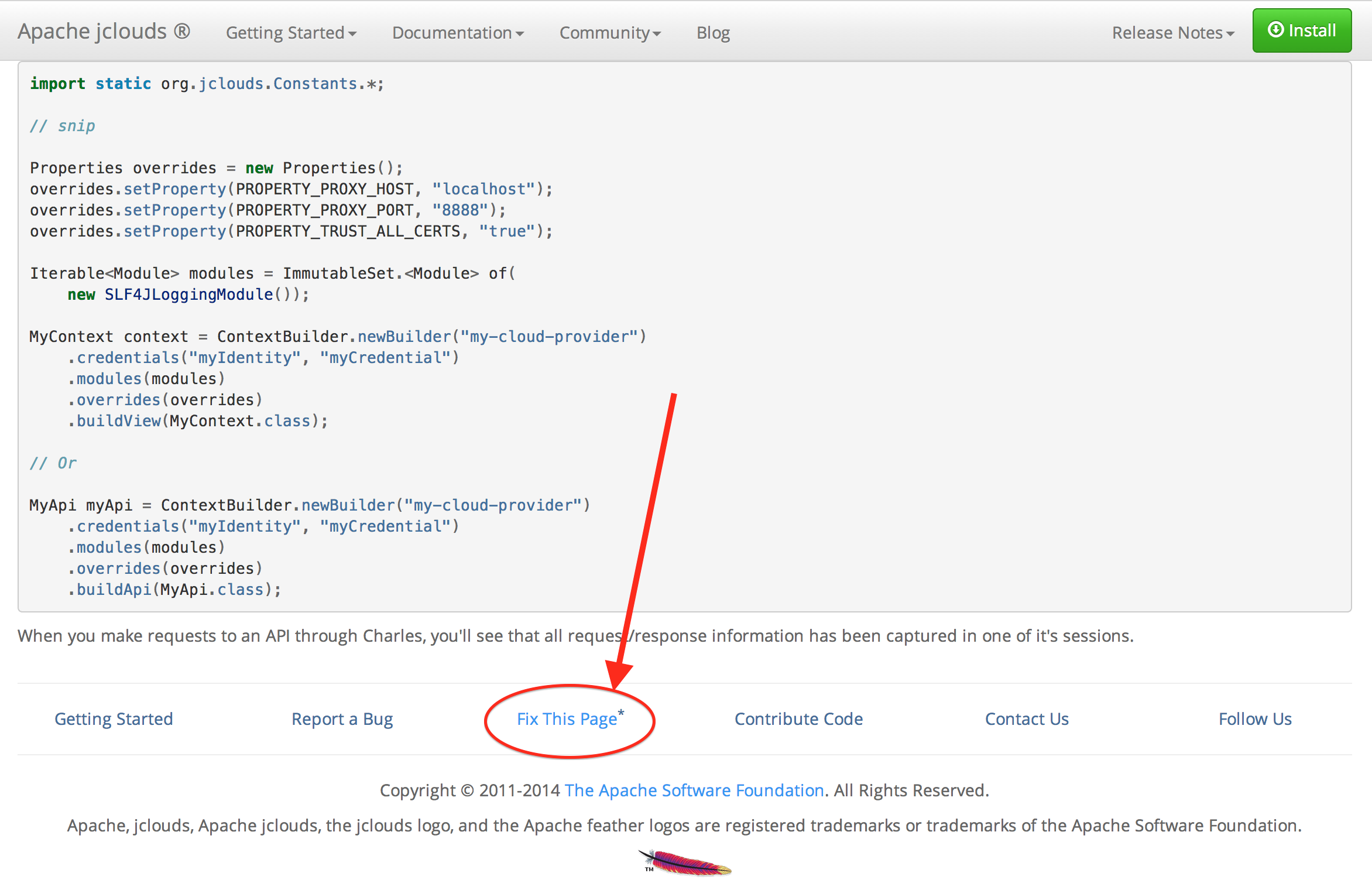
<li>The contributor, wanting to make an improvement, clicks on the Fix This Page link at the bottom of any page on the jclouds <a href="http://jclouds.apache.org/">website</a> (<a href="/img/posts/walk-n-doc-01.png">screenshot</a>).</li>
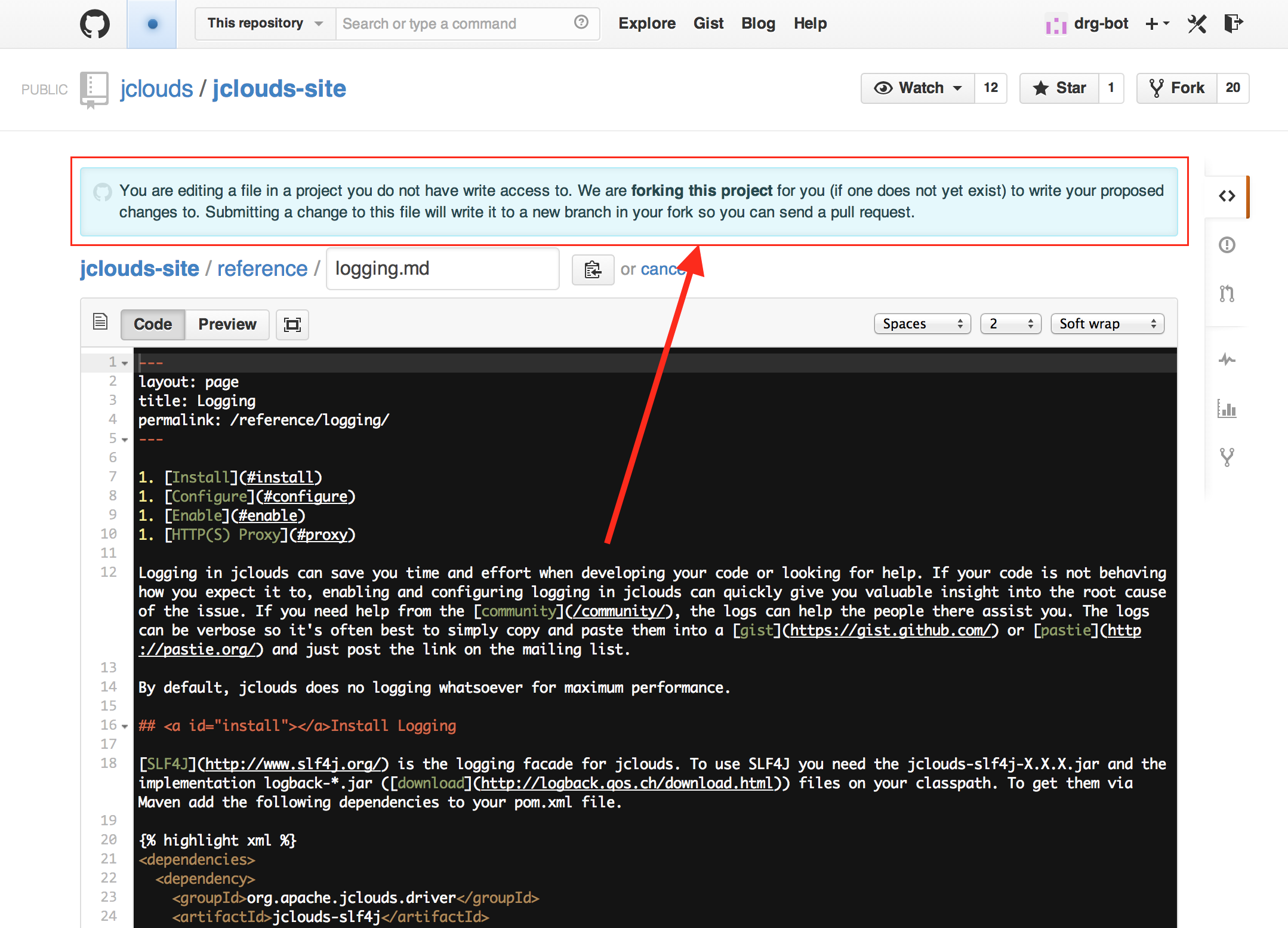
<li>The contributor edits the page while GitHub automatically forks the <a href="https://github.com/jclouds/jclouds-site/">jclouds-site repo</a> in the background, if necessary (<a href="/img/posts/walk-n-doc-02.png">screenshot</a>). Note that the contributor needs a GitHub account and will need to be logged in.</li>
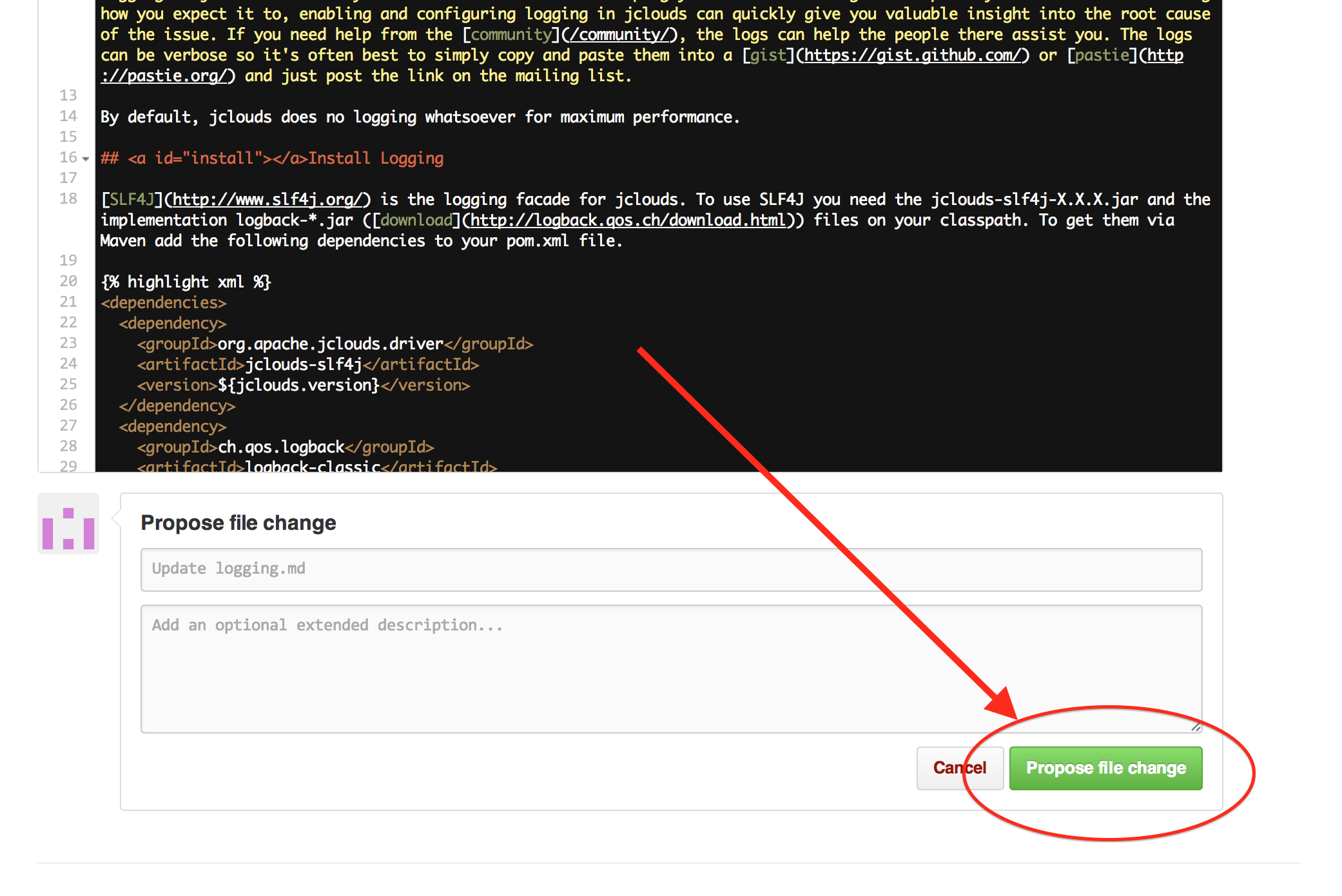
<li>The contributor proposes the edits while GitHub automatically create a branch for the commit (<a href="/img/posts/walk-n-doc-03.png">screenshot</a>).</li>
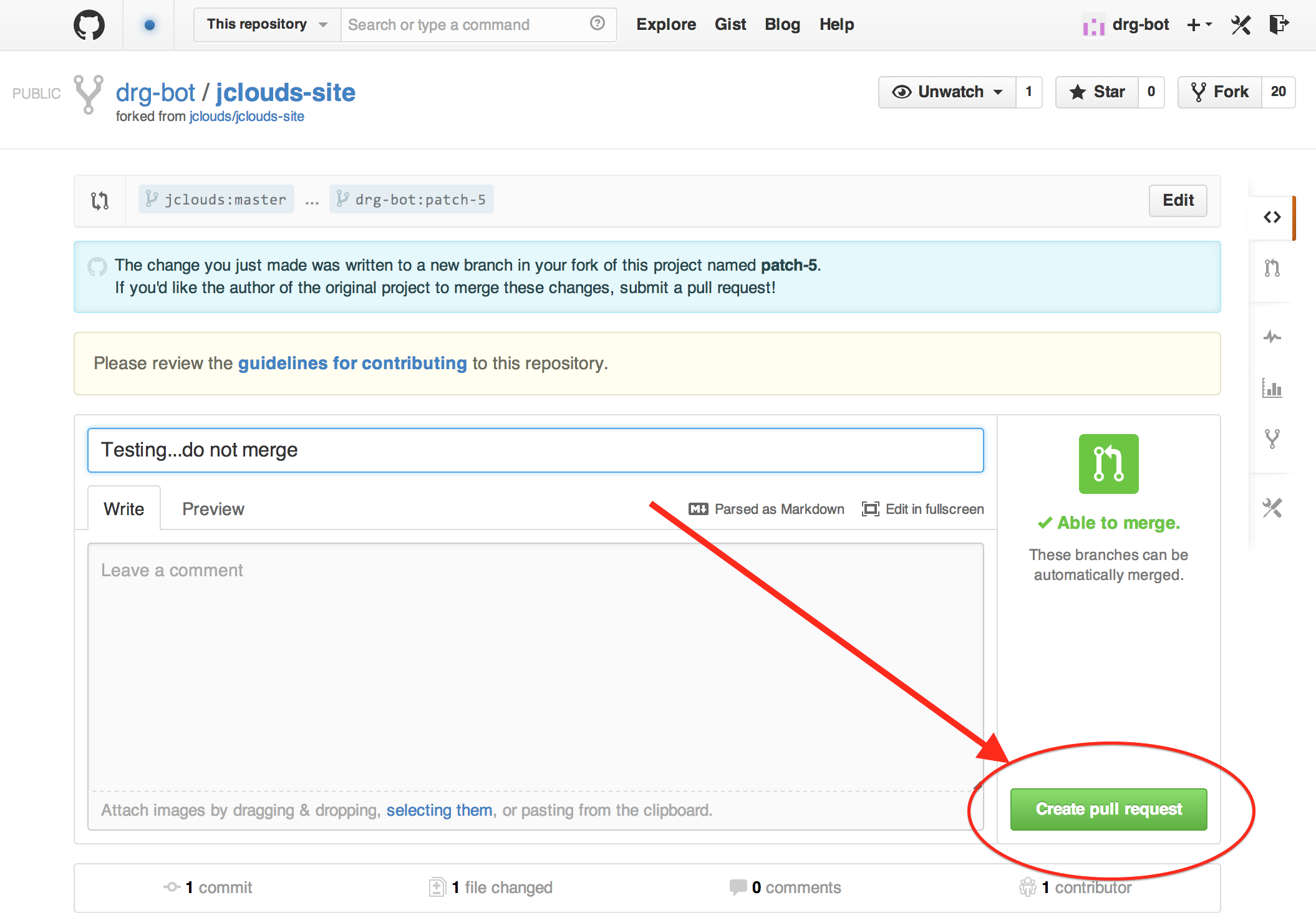
<li>The contributor creates a pull request (<a href="/img/posts/walk-n-doc-04.png">screenshot</a>).</li>
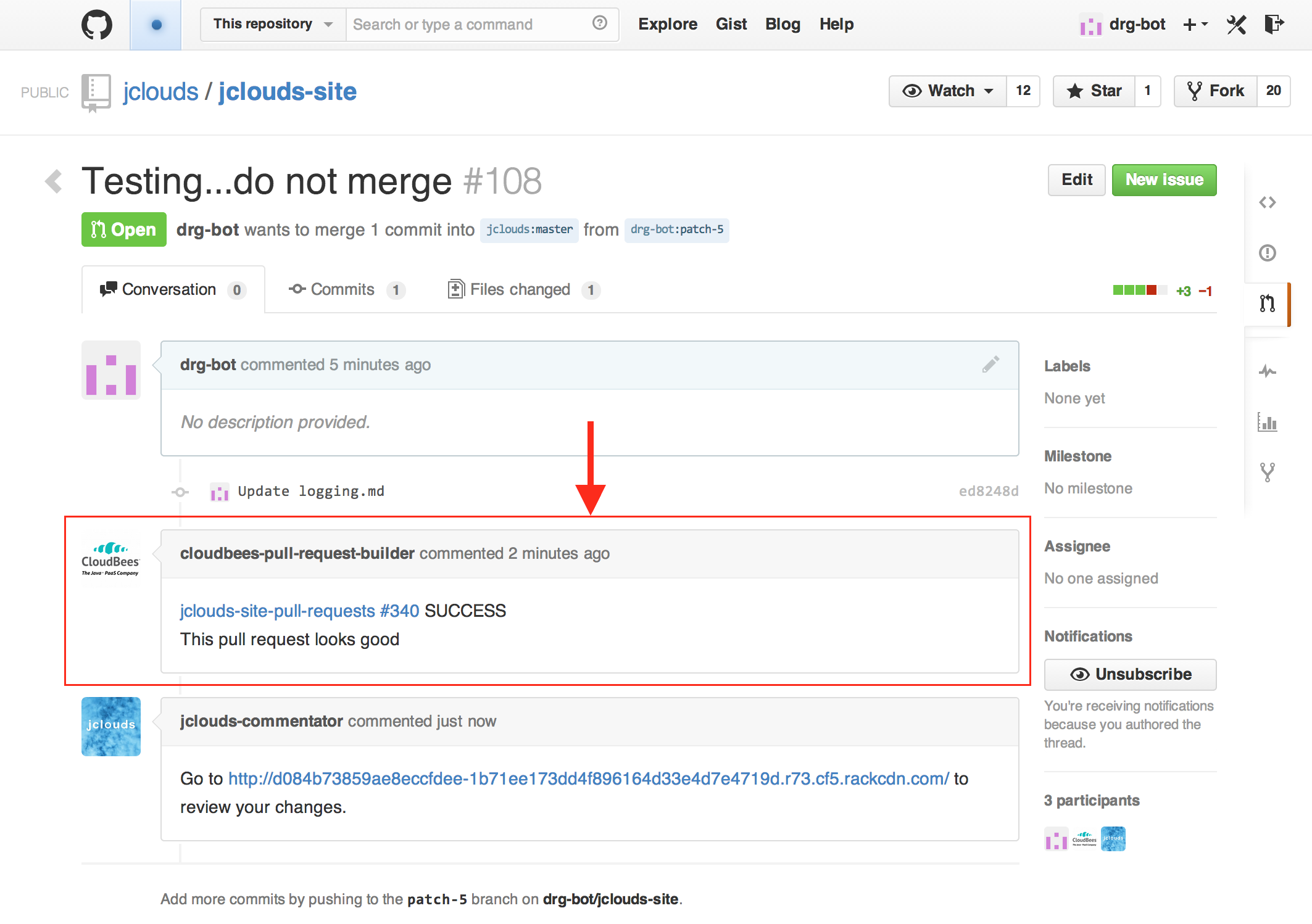
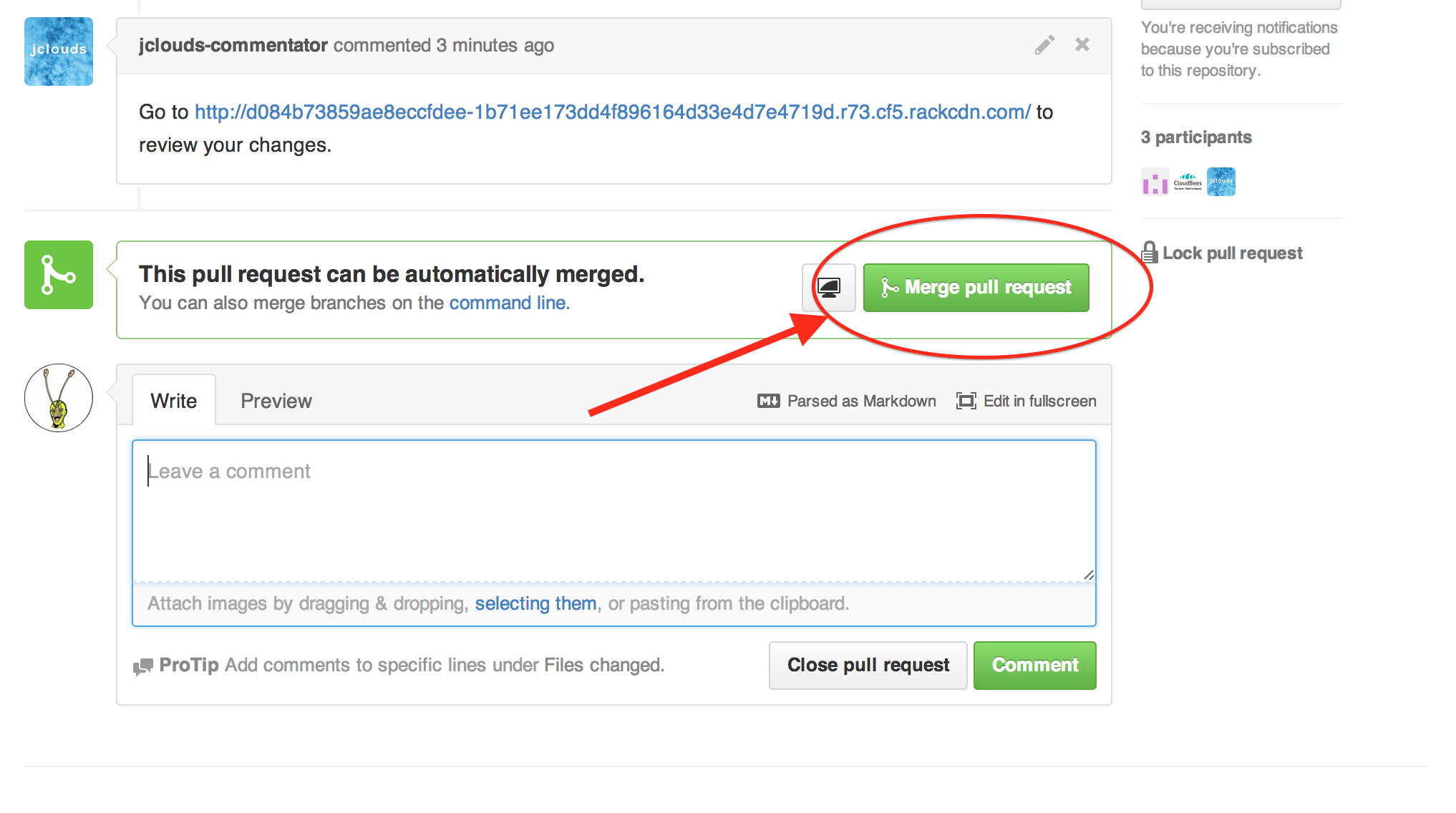
<li>The doc system automatically builds the entire jclouds website with the contributor's edits included and comments on the pull request when done (<a href="/img/posts/walk-n-doc-05.png">screenshot</a>).</li>
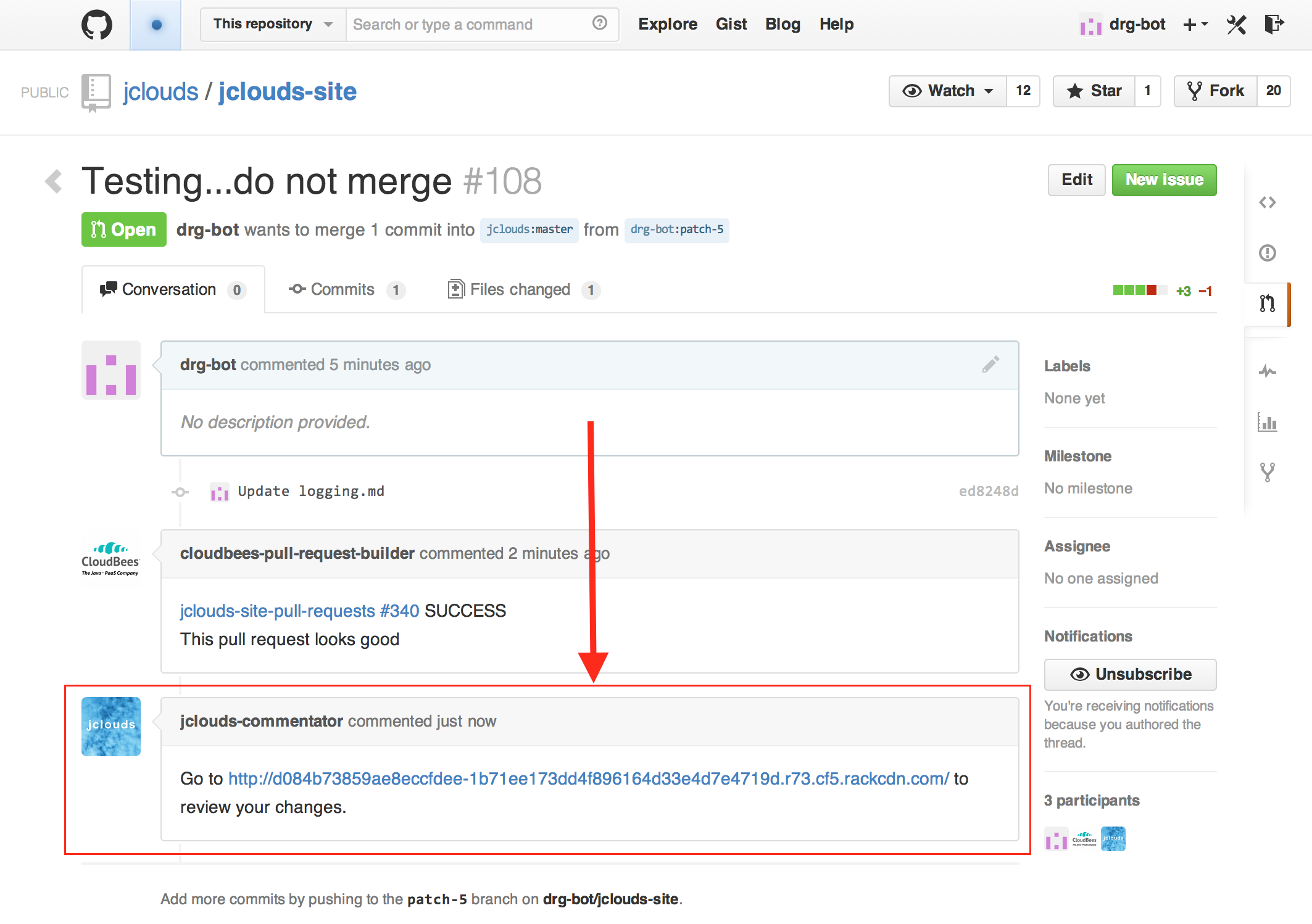
<li>The doc system automatically uploads the staging jclouds website to <a href="http://jclouds.apache.org/guides/rackspace/#files">Rackspace Cloud Files</a> and comments on the pull request with a link to the staging website when done (<a href="/img/posts/walk-n-doc-06.png">screenshot</a>).</li>
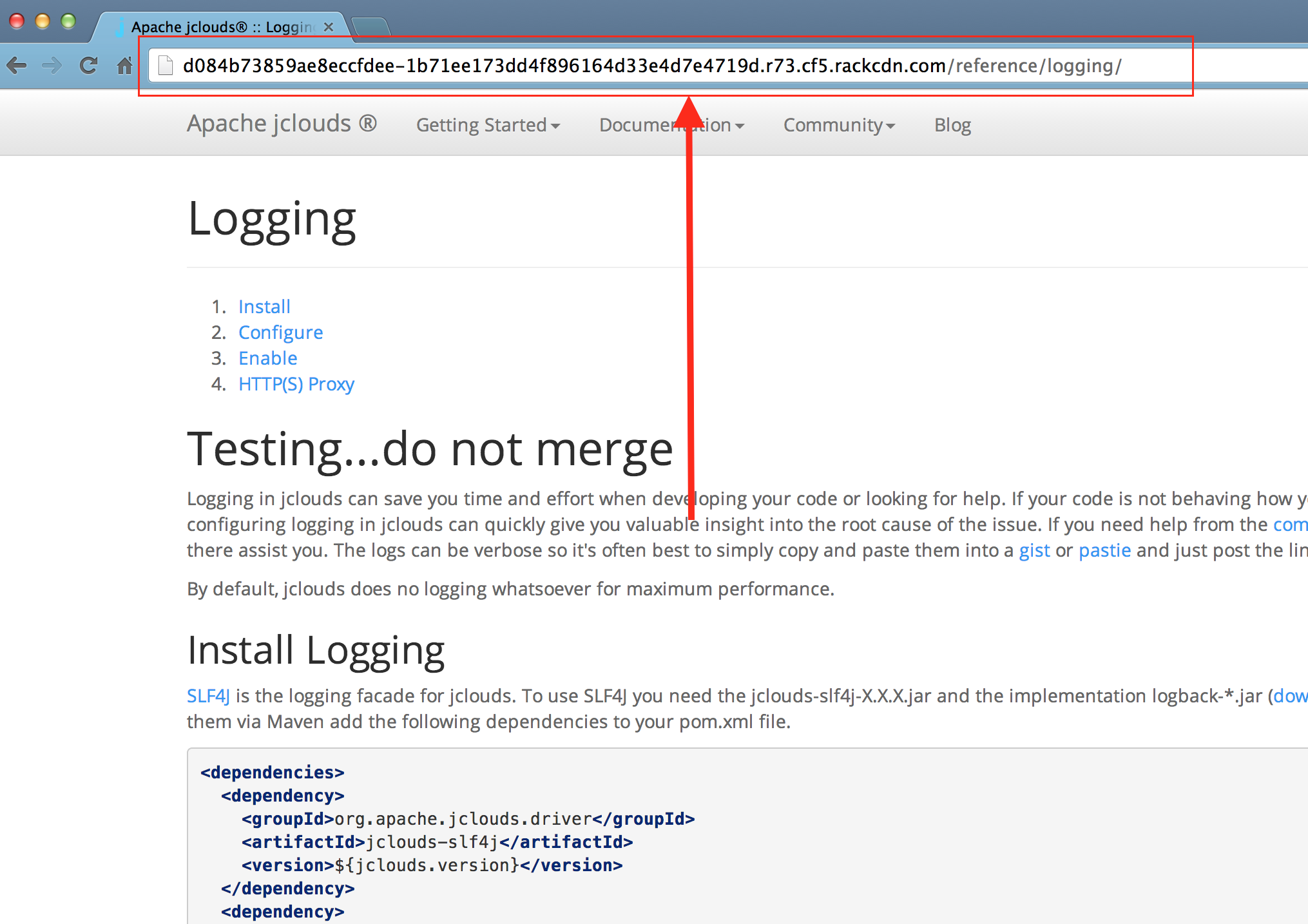
<li>The contributor and the reviewer both click on the link to the staging website so they can both review the exact same rendered changes (<a href="/img/posts/walk-n-doc-07.png">screenshot</a>).</li>
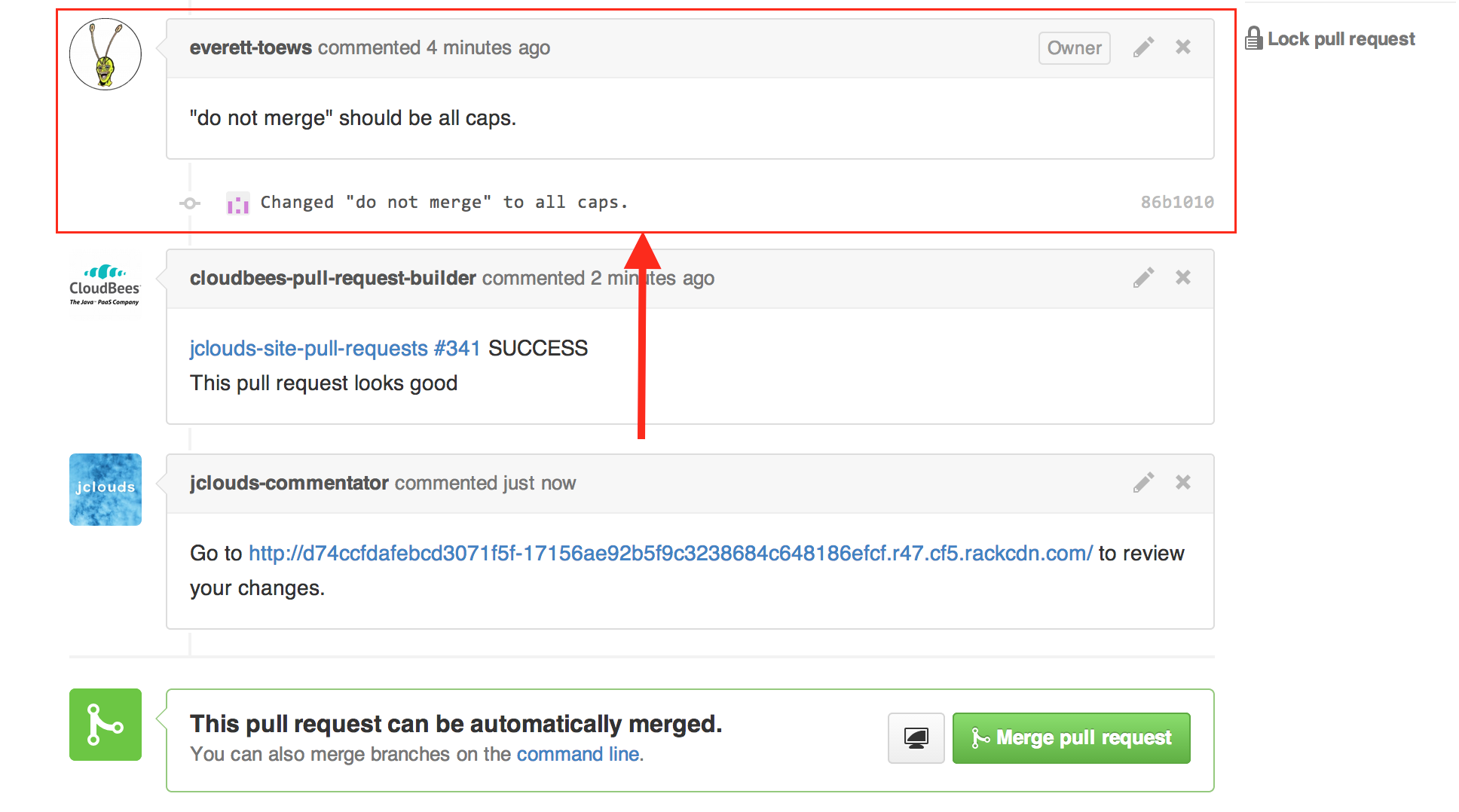
<li>If the reviewer requests changes, the contributor edits the file(s) within the pull request and proposes those edits in an additional commit. The process goes back to #5 (<a href="/img/posts/walk-n-doc-08.png">screenshot</a>).</li>
<li>The reviewer rejoices when the changes look good and merges the pull request (<a href="/img/posts/walk-n-doc-09.png">screenshot</a>).</li>
</ol>


<div class="row clearfix">
  <div class="col-md-8 column">
    <table class="table table-bordered">
      <tr>
        <td>1. <a href="/img/posts/walk-n-doc-01.png"><img src="/img/posts/walk-n-doc-01.png" width="300"></a></td>
        <td>2. <a href="/img/posts/walk-n-doc-02.png"><img src="/img/posts/walk-n-doc-02.png" width="300"></a></td>
        <td>3. <a href="/img/posts/walk-n-doc-03.png"><img src="/img/posts/walk-n-doc-03.png" width="300"></a></td>
      </tr>
      <tr>
        <td>4. <a href="/img/posts/walk-n-doc-04.png"><img src="/img/posts/walk-n-doc-04.png" width="300"></a></td>
        <td>5. <a href="/img/posts/walk-n-doc-05.png"><img src="/img/posts/walk-n-doc-05.png" width="300"></a></td>
        <td>6. <a href="/img/posts/walk-n-doc-06.png"><img src="/img/posts/walk-n-doc-06.png" width="300"></a></td>
      </tr>
      <tr>
        <td>7. <a href="/img/posts/walk-n-doc-07.png"><img src="/img/posts/walk-n-doc-07.png" width="300"></a></td>
        <td>8. <a href="/img/posts/walk-n-doc-08.png"><img src="/img/posts/walk-n-doc-08.png" width="300"></a></td>
        <td>9. <a href="/img/posts/walk-n-doc-09.png"><img src="/img/posts/walk-n-doc-09.png" width="300"></a></td>
      </tr>
    </table>
  </div>
</div>


<p>While this might seem like a long process, it can actually be very quick. The process could happen in less than 5 minutes, if a simple edit required no additional changes and the reviewer signed off right away. It's important to note that there is no incidental complexity here. The process is as efficient as it could possibly be with respect to GitHub's workflow.</p>

<h2>The Implementation</h2>

<p>Here's how I implemented this doc system in the jclouds community.</p>

<ol>
<li>A GitHub account is needed to start a pull request</li>
<li>Markdown and HTML/CSS with Jekyll</li>
<li>Any web browser</li>
<li>Jenkins to install and configure the doc build tools so the contributor doesn't have to</li>
<li>Jenkins' jobs to build the website with Jekyll and to upload the staging jclouds website to Rackspace Cloud Files using jclouds</li>
</ol>


<h3>GitHub</h3>

<p>Many people have <a href="https://github.com/">GitHub</a> accounts already and getting one is trivial. It also gives the jclouds community a good idea about who is making the contribution. The <a href="https://help.github.com/articles/using-pull-requests">pull request</a> is the primary unit of collaboration on GitHub.</p>

<h3>Markdown and HTML/CSS</h3>

<p>Simple <a href="http://daringfireball.net/projects/markdown/">Markdown</a> documents with HTML/CSS make up the content of the jclouds website documentation. They are combined using <a href="http://jekyllrb.com/">Jekyll</a>, a template engine, so that contributors can focus on the content and not the layout of the entire website.</p>

<h3>Web Browser</h3>

<p>It doesn't get anymore ubiquitous than the web browser. The Markdown documents can be edited in a textarea on GitHub from a web browser. The web has trained us to fill out online forms and this is no different. You could just as easily go through the process above on your mobile phone.</p>

<h3>Jenkins</h3>

<p><img class="img-right" src="/img/posts/jenkins.png"/><a href="http://jenkins-ci.org/">Jenkins</a>, at the heart of the doc system, is responsible for building the website with Jekyll and uploading the staging jclouds website to Rackspace Cloud Files using jclouds. Installation and configuration of Jenkins itself is outside the scope of this post but it's relatively easy to get started using it. You need the <a href="http://blog.cloudbees.com/2012/01/better-integration-between-jenkins-and.html">GitHub Plugin and configure a webhook</a> to fire when a pull request is made to your GitHub repo.</p>

<h3>Jenkins Jobs</h3>

<p>Jenkins jobs are what get the work done in the jclouds doc system. The 2 jobs are:</p>

<ol>
<li>jclouds-site-pull-requests to build the website with Jekyll</li>
<li>jclouds-site-staging to upload the website to Cloud Files with jclouds.</li>
</ol>


<h4>Job: jclouds-site-pull-requests</h4>

<p>Relevant settings:</p>

<ul>
<li>Project name: jclouds-site-pull-requests</li>
<li>Source Code Management

<ul>
<li>Repository URL: git://github.com/jclouds/jclouds-site.git</li>
<li>Branches to build: origin/master</li>
</ul>
</li>
<li>Build Triggers

<ul>
<li>Build pull requests to the repository: Checked</li>
</ul>
</li>
</ul>


<p>Execute shell 1:</p>

<script src="https://gist.github.com/everett-toews/e2061a056b31b1bc5a2c.js"></script>


<p>More relevant settings:</p>

<ul>
<li>Post-build Actions

<ul>
<li>Files to archive: _site/<em>*/</em></li>
<li>Projects to build: jclouds-site-staging</li>
</ul>
</li>
</ul>


<h4>Job: jclouds-site-staging</h4>

<p>Relevant settings:</p>

<ul>
<li>Project name: jclouds-site-staging</li>
<li>Source Code Management

<ul>
<li>None</li>
</ul>
</li>
<li>Build Triggers

<ul>
<li>Build after other projects are built: Checked</li>
<li>Project names: jclouds-site-pull-requests</li>
</ul>
</li>
<li>Build

<ul>
<li>Copy artifacts from another project

<ul>
<li>Project name: jclouds-site-pull-requests</li>
<li>Which build: Upstream build that triggered this job</li>
<li>Artifacts to copy: _site/<em>*/</em></li>
</ul>
</li>
</ul>
</li>
</ul>


<p>Execute shell 1:</p>

<script src="https://gist.github.com/everett-toews/034473bad5ad6cd5cad2.js"></script>


<p>Execute shell 2:</p>

<script src="https://gist.github.com/everett-toews/9dd74e0f655e6b567253.js"></script>


<p>comment.py</p>

<script src="https://gist.github.com/everett-toews/4e7295ecfd33ac14d92e.js"></script>


<p>The jclouds community actually uses <a href="http://www.cloudbees.com/">CloudBees</a> extensively as the place to host our Jenkins jobs. However, these jobs have been generalized and should run on Jenkins with the GitHub plugin.</p>

<h2>Coda</h2>

<p>This isn't just about documentation; it's about building community through contribution. If you can get a user to make a documentation contribution, that user will be much more engaged in your community. They will have feeling of ownership and pride in a piece of software that they depend on and that they have improved. These are the users who will be with you through thick and thin, and who will find other ways to contribute to your project.</p>

<p>You might not be able to implement this system exactly as I've done it in the jclouds community but the important part is finding ways to lower the barriers to contributing documentation. I didn't build this system in a day. Tackle each of the barriers above one at a time. Eventually you'll be able to put the pieces together into a system that works for you.</p>
]]></content>
  </entry>
  
  <entry>
    <id>https://jclouds.apache.org/blog/2014/04/23/gsoc</id>
    <title type="html"><![CDATA[GSoC Students]]></title>
    <link href="https://jclouds.apache.org/blog/2014/04/23/gsoc"/>
    <updated>2014-04-23T00:00:00Z</updated>
    <content type="html"><![CDATA[<p>The <a href="https://developers.google.com/open-source/soc/">Google Summer of Code</a> (GSoC) <a href="https://www.google-melange.com/gsoc/projects/list/google/gsoc2014">accepted projects</a> have been announced and we will have 3 students working on jclouds related projects!</p>

<h2>Google Cloud Storage support for jclouds</h2>

<p><a href="https://www.google-melange.com/gsoc/project/details/google/gsoc2014/bhash90/5741031244955648">Project Acceptance</a></p>

<p><a href="https://issues.apache.org/jira/browse/JCLOUDS-458">Project Description</a></p>

<p>Student: Bhathiya</p>

<p>Mentor: Matt Stephenson</p>

<h2>Amazon Glacier support for jclouds</h2>

<p><a href="https://www.google-melange.com/gsoc/project/details/google/gsoc2014/rcoedo/5668600916475904">Project Acceptance</a></p>

<p><a href="https://issues.apache.org/jira/browse/JCLOUDS-457">Project Description</a></p>

<p>Student: Roman Coedo</p>

<p>Mentor: Andrew Gaul</p>

<h2>Porting EC2 support with jclouds integration in Apache Airavata</h2>

<p><a href="https://www.google-melange.com/gsoc/project/details/google/gsoc2014/udara/5741031244955648">Project Acceptance</a></p>

<p>Student: Nipun Udara</p>

<p>Mentors: Suresh Marru, Lahiru Gunathilake</p>

<h2>Conclusion</h2>

<p>Congrats to all of the students and thanks to all of the mentors!</p>

<p>Three cheers to Andrew Gaul for kicking this off and getting us into the Google Summer of Code.</p>
]]></content>
  </entry>
  
  <entry>
    <id>https://jclouds.apache.org/blog/2014/03/04/jclouds-meetup</id>
    <title type="html"><![CDATA[jclouds Meetup]]></title>
    <link href="https://jclouds.apache.org/blog/2014/03/04/jclouds-meetup"/>
    <updated>2014-03-04T00:00:00Z</updated>
    <content type="html"><![CDATA[<p>Last night we held a jclouds meetup at Cloudera offices in San Francisco. It was a well attended meetup and there were a number of new faces along with our more regular group of attendees. We recorded the whole thing with Google Hangouts on Air and you can get to know everyone in the first 5 minutes!</p>

<iframe width="640" height="360" src="//www.youtube.com/embed/8nuON0zGVJI?rel=0" frameborder="0" allowfullscreen></iframe>


<h2>Presentations</h2>

<p>I kicked things off with an introduction to jclouds at <a href="http://www.youtube.com/watch?v=8nuON0zGVJI&amp;t=3m50s">0:04 of the meetup</a>. I'll be giving this presentation at ApacheCon on April 7, 2014 and wanted to take this opportunity to practice it in front of a captive audience. You can find my presentation slides at <a href="http://www.slideshare.net/phymata/introduction-to-apache-jclouds">Introduction to Apache jclouds</a>.</p>

<p>Next up was Andrew Gaul from Maginatics with an informative presentation at <a href="http://www.youtube.com/watch?v=8nuON0zGVJI&amp;t=40m00s">0:40 of the meetup</a> on <a href="http://www.slideshare.net/Maginatics/apache-jclouds-atmaginatics">Apache jclouds at Maginatics</a>. I personally learned a lot from Andrew's presentation like the wide variety of differences amongst object storage providers. The engineering work that Gaul and the team from Maginatics have done around the BlobStore portable API in jclouds is impressive.</p>

<p>At <a href="http://www.youtube.com/watch?v=8nuON0zGVJI&amp;t=69m0s">1:09 of the meetup</a> we made a toast to Ignasi Barrera for his work in kicking off the jclouds website redesign. Thanks Ignasi! And thanks to everyone who helped make it a reality!</p>

<h2>Discussion</h2>

<p>Then we had a good talk about the future of jclouds. A few interesting points came out of the discussion.</p>

<ol>
<li>It's time to seriously considering dropping support for Java 6. Java 6 is officially end-of-life and has been a security bug ridden mess for Java. It's time to move on. We agreed on a rough plan of action to move forward.

<ol>
<li>Reach out to users. A blog post dedicated to the topic and sending out an email and tweets to get user feedback.</li>
<li>The last branch to have support for Java 1.6 will be a long lived branch, effectively indefinite. We will backport crucial bug fixes and do releases on the branch but no new features will be added to it.</li>
<li>The exact timing and releases in which these things happen have yet to be decided on.</li>
</ol>
</li>
<li>There was concern expressed by the Maginatics team over the performance impact of the RestAnnotationProcessor for BlobStore intensive work.

<ol>
<li>In his presentation, Gaul mentioned that Maginatics had discovered that the overhead of reflection call in the RestAnnotationProcessor were causing what should have been I/O intensive work to also be CPU bound.</li>
<li>The Maginatics team was interested in experimenting with alternatives to the RestAnnotationProcessor.</li>
<li>This experimentation could be achieved by supporting a new BlobStore provider or altering a seldom used BlobStore provider with a new way of making the HTTP calls.</li>
</ol>
</li>
<li>There was also some interest in creating a compatibility matrix of what features cloud providers offer and what subset of those features jclouds supported.

<ol>
<li>Andrew Gaul offered to create such a matrix for BlobStore providers.</li>
<li>Andrew Bayer offered to create such a matrix for ComputeService providers.</li>
</ol>
</li>
</ol>


<h2>Next</h2>

<p>Next up, you can find jclouds at SXSW Interactive at the <a href="https://sup.sxsw.com/schedule/IAP17712">Cloud Portability Workshop with Multi-Cloud Toolkits</a>. You can also find us at ApacheCon in the <a href="http://apacheconnorthamerica2014.sched.org/event/50669b4904135c2ee7c755b923120ab3">Introduction to Apache jclouds</a>, <a href="http://apacheconnorthamerica2014.sched.org/event/7a27f693d6c64f946568eb3ee4fd6354">Taming the Cloud Database with Apache jclouds</a>, and <a href="http://apacheconnorthamerica2014.sched.org/event/8032b496d174c581fbf8f43dd3526e1e">Enabling Walkup Contributions to Your Project Documentation</a> sessions. Hope to see you there!</p>

<h2>Conclusion</h2>

<p>Thanks to Cloudera for hosting the meetup and supplying the food and drinks. Join the <a href="/community/">jclouds community</a> or sign up at the <a href="http://www.meetup.com/jclouds/">jclouds meetup</a> to get automatic notifications for our next meetup.</p>
]]></content>
  </entry>
  
  <entry>
    <id>https://jclouds.apache.org/blog/2014/03/03/joining-the-asf-new-site-and-jclouds-1-7</id>
    <title type="html"><![CDATA[Joining the ASF, new site, and jclouds 1.7!]]></title>
    <link href="https://jclouds.apache.org/blog/2014/03/03/joining-the-asf-new-site-and-jclouds-1-7"/>
    <updated>2014-03-03T00:00:00Z</updated>
    <content type="html"><![CDATA[<p>It's been a while since our last blog post, and lots has happened since then. There have been many things that have kept us busy, and finally, all the hard work is starting to show up. During this time, we've:</p>

<ul>
<li>Moved the project to <a href="http://www.apache.org">The Apache Software Foundation</a> and consolidated our community processes.</li>
<li>Rebranded the entire site.</li>
<li>Released <a href="/releasenotes/1.6.3/">1.6</a> bugfix versions.</li>
<li>Released jclouds <a href="/releasenotes/1.7/">1.7.0</a> and <a href="/releasenotes/1.7.1/">1.7.1</a> with important features and bugfixes.</li>
</ul>


<h2>Moving to the Apache Software Foundation</h2>

<p>Moving to the ASF has been one of the most important steps we've taken regarding the project structure. This change has given us better legal support, more infrastructure tools, has helped us formalize and improve our workflows, and helped us focus on properly managing and building the community.</p>

<p>We'll never be thankful enough to <a href="https://twitter.com/adrianfcole">Adrian</a> for his hard work on the project, and for kindly helping, mentoring and welcoming us to participate in it. There have been many years of hard work that have put jclouds where it is right now, and moving to the ASF has been just a natural step towards the maturity of the project and the need to properly manage the community growth.</p>

<p>After a relatively short period in the <a href="https://incubator.apache.org">Incubator</a> learning a lot from our <a href="https://incubator.apache.org/projects/jclouds.html">mentors</a>, and with the valuable guidance from <a href="https://twitter.com/abayer">Andrew Bayer</a> and his help making the first releases, we graduated as a top level project... and here we are!</p>

<h2>New design for the main site</h2>

<p>Another important change that has kept us busy has been the rebranding of the main site. We've tried to improve it so:</p>

<ul>
<li>Documentation is easier to find.</li>
<li>Pages look cleaner and are easier to read.</li>
<li>The entire style and structure of the pages is more consistent.</li>
</ul>


<p>We have focused on the design and on making the important documentation more accessible. An upcoming effort to improve the contents is coming, and we'd love your feedback, or even better, <a href="https://cwiki.apache.org/confluence/display/JCLOUDS/How+to+Contribute+Documentation">your help</a>!.</p>

<h2>jclouds 1.7.0 and 1.7.1 released!</h2>

<p>The jclouds 1.7 releases include many new features and some major changes that will be completed in upcoming major releases. Here is a summary of the notable changes, but make sure to check the <a href="/releasenotes/">release notes</a>:</p>

<ul>
<li>Removed the async interfaces from most of the compute providers. Starting from jclouds 1.7.0, the async interfaces have been deprecated. They provided little value to the project and added considerable complexity to its maintenance. Current users of the async features can configure and use their own executors to handle concurrent requests. See e.g. <a href="https://github.com/jclouds/jclouds-cloud-storage-workshop/blob/master/exercise2/src/main/java/org/jclouds/labs/blobstore/exercise2/MultiFileUploaderC.java">MultiFileUploaderC.java</a> for an example of carrying out an async blobstore request.</li>
<li>Added support for the <a href="https://cloudsigma-docs.readthedocs.org/en/2.10/">CloudSigma v2 API</a>.</li>
<li>Added the <a href="https://www.digitalocean.com">DigitalOcean</a> provider.</li>
<li>Added the <a href="http://square.github.io/okhttp/">OkHttp</a> HTTP driver for improved HTTP connections.</li>
<li>Properly support HTTP PATCH methods.</li>
<li>Added Rackspace Autoscale support.</li>
<li>Added OpenStack Databases (Trove) and Rackspace Cloud Databases support.</li>
<li>Added OpenStack Queuing (Marconi) and Rackspace Cloud Queues support.</li>
<li>Added OpenStack Networking (Neutron) v2.0 support.</li>
<li>Added support for full Google Compute Engine v1beta16 API</li>
<li>Allow <code>jclouds-chef</code> to manage custom environments.</li>
<li>... and many more!</li>
</ul>


<p>Want to see all this in action? <a href="/start/install">Download</a> and start using the latest jclouds version!</p>

<h2>Special thanks</h2>

<p>These have been very busy months and many things have been going on. We'd especially like to thank all <a href="https://cwiki.apache.org/confluence/display/JCLOUDS/Test+Provider+Thanks">providers that are helping</a> us improve the quality of the project by giving us testing accounts. This is helping us a lot and allows us to perform better testing of supported providers before every release.</p>

<p>We also want to thank <a href="http://www.ohloh.net/p/jclouds/contributors?query=&amp;sort=latest_commit">everyone that helped</a> by contributing code, documentation, or participating in the <a href="/community">mailing lists</a>. We love having your feedback and contributions!</p>

<p><strong>Thank you all!</strong></p>
]]></content>
  </entry>
  
  <entry>
    <id>https://jclouds.apache.org/blog/2013/05/13/jclouds-at-gluecon-2013</id>
    <title type="html"><![CDATA[jclouds at Gluecon 2013]]></title>
    <link href="https://jclouds.apache.org/blog/2013/05/13/jclouds-at-gluecon-2013"/>
    <updated>2013-05-13T00:00:00Z</updated>
    <content type="html"><![CDATA[<p><a href="https://twitter.com/everett_toews">Everett Toews</a> is hitting the road, getting some hands on keyboards, and really teaching developers how to use jclouds. He'll be giving a workshop titled <em>"Solve the Cross-Cloud Conundrum with jclouds"</em> at <a href="http://www.gluecon.com/2013/">Gluecon</a> this year. The session is on May 22 from 10:30 to 11:30 am in Breakout 2.</p>

<h2>Gluecon</h2>

<p>What is Gluecon? In their own words:</p>

<blockquote><p><em>Cloud, Mobile, APIs, Big Data - all of the converging, important trends in technology today share one thing in common: developers.</em></p>

<p><em>Developers are the vanguard. Developers are building in the cloud, building mobile applications, utilizing and building APIs, and working with big data. At the end of the day, developers are the core.</em></p></blockquote>

<p>This session will get developers doing what they do best. The workshop includes an overview of jclouds, its terminology, and its community then it quickly gets down to development. First, we'll install jclouds for use on the command line during the workshop. Then we'll work through an example of using jclouds to start virtual machines in multiple clouds. Rackspace will be offering free cloud trial accounts to the attendees of this session. It's their way of helping you get started in the cloud and say thanks for coming out.</p>

<h2>Conclusion</h2>

<p>The reason to use jclouds is to control your cloud infrastructure with Java. In this workshop Everett be showing you exactly how to do that.</p>
]]></content>
  </entry>
  
  <entry>
    <id>https://jclouds.apache.org/blog/2013/04/28/jclouds-1-6-0-released</id>
    <title type="html"><![CDATA[jclouds 1.6.0 released!]]></title>
    <link href="https://jclouds.apache.org/blog/2013/04/28/jclouds-1-6-0-released"/>
    <updated>2013-04-28T00:00:00Z</updated>
    <content type="html"><![CDATA[<p>jclouds 1.6 represents 7 months of refactoring to essentially "reset" the project 4 years after its founding. The goal was to do less magic and be easier to code and troubleshoot.</p>

<p>No doubt, we've added new apis, including ones from OpenStack, Rackspace, AWS, DynECT, and UltraDNS, so if any of that interests you, move on to details in the <a href="/documentation/releasenotes/1.6/">release notes</a>.</p>

<p>Most exciting is our move to the <a href="http://wiki.apache.org/incubator/jcloudsProposal">Apache Incubator</a>. Watch out as details will unfold this week as we progress to our next level of open source!</p>

<p>In the mean time, update your jclouds to version 1.6.0 and let us know how it works for you.</p>
]]></content>
  </entry>
  
  <entry>
    <id>https://jclouds.apache.org/blog/2012/12/12/jclouds-1-5-4-mistletoe-released</id>
    <title type="html"><![CDATA[jclouds 1.5.4 "Mistletoe" released]]></title>
    <link href="https://jclouds.apache.org/blog/2012/12/12/jclouds-1-5-4-mistletoe-released"/>
    <updated>2012-12-12T00:00:00Z</updated>
    <content type="html"><![CDATA[<p>jclouds community is an international group with over <a href="https://www.ohloh.net/p/jclouds">100</a> contributors since we started in early 2009. The idea of holidays vary, but we decided <strong>Mistletoe</strong> as an appropriate codename for jclouds 1.5.4. Here's why.</p>

<h2>Chef and Karaf</h2>

<p>We've noticed an attraction between systems that use <a href="http://www.getchef.com/">chef</a> and those that use <a href="https://karaf.apache.org/">karaf</a>. For example, it isn't uncommon to have a <a href="https://jclouds-dev.googlegroups.com/attach/2155fd6ba2a80939/Comm%20Cloud%20IOC.png?view=1&amp;part=4">deployment pipeline</a> that incorporates the two. Since jclouds has subproject for both chef and karaf, it seemed natural to cozy them together. Thanks to <a href="https://twitter.com/iocanel">Ioannis</a> and <a href="https://twitter.com/IgnasiBarrera">Ignasi</a>, karaf and chef are now a couple!</p>

<p>For example, the following syntax can be used in karaf directly, or via the <a href="https://github.com/jclouds/jclouds-cli">jclouds cli</a> to start a node in any supported cloud and bootstrap chef recipes.</p>

<div class="highlight"><pre><code class="bash">karaf@root&gt;node-create --adminAccess --recipe chef/java::openjdk karaf
</code></pre></div>


<h2>What else is in 1.5.4?</h2>

<p>We've a number of other highlights in jclouds 1.5.4. Many thanks to the code contributors <a href="https://github.com/jclouds/jclouds/compare/jclouds-1.5.3...jclouds-1.5.4">jclouds</a>, <a href="https://github.com/jclouds/jclouds-chef/compare/jclouds-chef-1.5.3...jclouds-chef-1.5.4">jclouds-chef</a>, <a href="https://github.com/jclouds/jclouds-karaf/compare/jclouds-karaf-1.5.3...jclouds-karaf-1.5.4">jclouds-karaf</a>, and <a href="https://github.com/jclouds/jclouds-cli/compare/jclouds-cli-1.5.3...jclouds-cli-1.5.4">jclouds-cli</a> for putting them together. Also to our review team for helping ensure quality: <a href="https://github.com/andrewgaul">Andrew Gaul</a> and <a href="https://github.com/mattstep">Matt</a> for code, and <a href="https://github.com/silkysun">Becca</a> on docs.</p>

<h3>Rackspace Cloud Load Balancers</h3>

<p><a href="https://github.com/everett-toews">Everett</a> modernized support for <strong>rackspace-cloudloadbalancers-us</strong> and <strong>uk</strong> is now available. This includes syntactic sugar such as auto-pagination and easy transforms.</p>

<div class="highlight"><pre><code class="java"><span class="n">FluentIterable</span><span class="o">&lt;</span><span class="n">HostAndPort</span><span class="o">&gt;</span> <span class="n">sockets</span> <span class="o">=</span> <span class="n">clb</span><span class="o">.</span><span class="na">getLoadBalancerApiForZone</span><span class="o">(</span><span class="n">zone</span><span class="o">).</span><span class="na">list</span><span class="o">().</span><span class="na">concat</span><span class="o">().</span><span class="na">transform</span><span class="o">(</span><span class="n">converter</span><span class="o">);</span>
</code></pre></div>


<h3>Nova Server Diagnostics</h3>

<p>Some implementations of Nova have diagnostic information available. Thanks to <a href="https://github.com/LeanderBB">Leander</a>, you can now discover this capability at runtime.</p>

<div class="highlight"><pre><code class="java"><span class="n">Optional</span><span class="o">&lt;</span><span class="n">Map</span><span class="o">&gt;</span> <span class="n">diagnosticInfo</span> <span class="o">=</span> <span class="n">novaApi</span><span class="o">.</span><span class="na">getServerApiForZone</span><span class="o">(</span><span class="s">&quot;az-1.region-a.geo-1&quot;</span><span class="o">).</span><span class="na">getDiagnostics</span><span class="o">(</span><span class="n">serverId</span><span class="o">);</span>
</code></pre></div>


<h3>S3 Multi-Object delete</h3>

<p><a href="http://maginatics.com/">Maginatics</a> have BlobStore containers with over a billion objects in them. S3 containers (buckets) can now be cleared with 1/1000 the requests, thanks to <a href="https://twitter.com/andreisavu">Andrei</a>'s additional support of S3 multi-delete.</p>

<div class="highlight"><pre><code class="java"><span class="n">DeleteResult</span> <span class="n">result</span> <span class="o">=</span> <span class="n">s3Api</span><span class="o">.</span><span class="na">deleteObjects</span><span class="o">(</span><span class="n">container</span><span class="o">,</span> <span class="n">keys</span><span class="o">);</span>
<span class="n">assertEquals</span><span class="o">(</span><span class="n">result</span><span class="o">.</span><span class="na">size</span><span class="o">(),</span> <span class="n">keys</span><span class="o">.</span><span class="na">size</span><span class="o">());</span>
</code></pre></div>


<h2>What's next</h2>

<p>We are working on 1.6, an effort more efficient and resilient. One tool we are evaluating for this is <a href="https://groups.google.com/forum/?fromgroups=#!topic/jclouds-dev/fVILfUoW_zg">Netflix Hystrix</a>. We are also working on 1.5.x releases, which are likely to include google compute engine and virtualization support. If interested in helping us out, hop onto IRC freenode #jclouds or join our dev group.</p>
]]></content>
  </entry>
  
  <entry>
    <id>https://jclouds.apache.org/blog/2012/11/17/jclouds-1-5-3-out-the-door</id>
    <title type="html"><![CDATA[jclouds 1.5.3 out the door]]></title>
    <link href="https://jclouds.apache.org/blog/2012/11/17/jclouds-1-5-3-out-the-door"/>
    <updated>2012-11-17T00:00:00Z</updated>
    <content type="html"><![CDATA[<p>Released on 2012-11-14, jclouds 1.5.3 includes minor fixes, and a few important updates.</p>

<ul>
<li>New <a href="https://github.com/jclouds/jclouds-examples/tree/master/rackspace/src/main/java/org/jclouds/examples/rackspace/cloudblockstorage">openstack-cinder</a> and <a href="/documentation/quickstart/rackspace/#volumes">rackspace-cloudblockstorage-us/uk</a> providers</li>
<li>Add new Asia Pacific (Sydney) Region [ap-southeast-2]</li>
<li>New <a href="https://github.com/jclouds/jclouds/blob/master/apis/ec2/src/main/java/org/jclouds/ec2/features/TagApi.java">TagApi</a> for ec2, in a revised syntax similar to openstack-nova</li>
<li>Handle network failures in large container (1M+) deletes in blobstore</li>
<li>jclouds-cli and jclouds-karaf now provide a more intuitive file-based interface for reading and writing blobs.</li>
</ul>


<p>Many thanks to the contributors in this release of <a href="https://github.com/jclouds/jclouds/compare/jclouds-1.5.2...jclouds-1.5.3">jclouds</a>, <a href="https://github.com/jclouds/jclouds-chef/compare/jclouds-chef-1.5.2...jclouds-chef-1.5.3">jclouds-chef</a>, <a href="https://github.com/jclouds/jclouds-karaf/compare/jclouds-karaf-1.5.2...jclouds-karaf-1.5.3">jclouds-karaf</a>, and <a href="https://github.com/jclouds/jclouds-cli/compare/jclouds-cli-1.5.2...jclouds-cli-1.5.3">jclouds-cli</a>. Also many thanks for the diligence of our review team: <a href="https://github.com/andrewgaul">Andrew Gaul</a> and <a href="https://github.com/mattstep">Matt</a> for code, and <a href="https://github.com/silkysun">Becca</a> on docs.</p>

<p>Moreover, we're indebted to <a href="http://blog.cloudbees.com/2012/11/500-jclouds-builds-on-buildhive-and.html">BuildHive</a> for checking over 500 pull requests to date! On a build side, we currently validate both JDK6 and JDK7 on each pull, thanks to <a href="https://github.com/demobox">Andrew Phillips</a>.</p>

<p>Please <a href="/documentation/userguide/install/">update</a> to jcloud 1.5.3 and check the new features. Particularly, try things out using JDK7. If you have questions, ping our user group or tag your question with <em>jclouds</em> on <a href="http://stackoverflow.com/tags/jclouds">stackoverflow</a>.</p>

<p>We are working on 1.6 now, which includes a lot of cleanup and mechanisms to make less api calls when starting groups of machines. If interested in helping us out, hop onto IRC freenode #jclouds or join our dev group.</p>
]]></content>
  </entry>
  
  <entry>
    <id>https://jclouds.apache.org/blog/2012/11/09/500-jclouds-builds-on-buildhive-and-counting</id>
    <title type="html"><![CDATA[500 jclouds builds on BuildHive and counting...]]></title>
    <link href="https://jclouds.apache.org/blog/2012/11/09/500-jclouds-builds-on-buildhive-and-counting"/>
    <updated>2012-11-09T00:00:00Z</updated>
    <content type="html"><![CDATA[<p>At jclouds, we've been running our Jenkins continuous integration jobs in CloudBees' <a href="http://www.cloudbees.com/dev">DEV@cloud</a> for a while now (CloudBees has a <a href="http://www.cloudbees.com/foss">FOSS</a> programme). We also have an active and ever-increasing contributor community, which amongst others means... lots of pull requests.</p>

<p>So we were very interested to hear about <a href="https://buildhive.cloudbees.com/">BuildHive</a>, another CloudBees initiative that integrates with your GitHub account to automatically trigger build jobs for pull requests, and quickly signed up.</p>

<p>We did not regret it. BuildHive has served as a crucial initial filter to allow us to concentrate precious reviewing time on working changes and to remain confident, as pull requests are updated, that we are not going to break the build.</p>

<p>Of the last 100 builds, we've had 7 with errors, 2 with warnings, and 1 incomplete, so a roughly 10% efficiency gain in terms of focussing pull request review time. In future, we may also use BuildHive to provide <em>style feedback</em> and similar metrics for pull requests - most likely some feature suggestions for CloudBees to come here!</p>

<p><strong>Thanks, BuildHive!</strong></p>
]]></content>
  </entry>
  
  <entry>
    <id>https://jclouds.apache.org/blog/2012/09/28/jclouds-1-5-is-out</id>
    <title type="html"><![CDATA[jclouds 1.5 is out!]]></title>
    <link href="https://jclouds.apache.org/blog/2012/09/28/jclouds-1-5-is-out"/>
    <updated>2012-09-28T00:00:00Z</updated>
    <content type="html"><![CDATA[<p>Over 6 months in the making, and just in time for JavaOne, jclouds 1.5 is formally released. Many of you have been awaiting (or helping build) massive new support for OpenStack based clouds. There's even more, such as our new <a href="https://github.com/jenkinsci/jclouds-plugin">Jenkins Plugin</a> and <a href="https://github.com/jclouds/jclouds-cli">command-line utility</a>.</p>

<p>I encourage you to check out our <a href="/documentation/releasenotes/1.5/">release notes</a> and give the newly minted version <a href="/documentation/userguide/install/">1.5.1</a> a whirl. If you haven't seen our new website, check it out and let <a href="https://twitter.com/silkysun">Becca</a> know how you like it!</p>

<p>For those of you looking to <a href="http://www.meetup.com/jclouds/">meetup</a>, you can find us at the <a href="http://www.cloudbees.com/jenkins-user-conference-2012-san-francisco.cb">Jenkins User Conference</a>, <a href="http://www.oracle.com/javaone/index.html">JavaOne</a>, <a href="http://www.meetup.com/jclouds/events/84544992/">meetup at Abiquo</a> during <a href="http://www.vmworld.com/community/conference/europe/">VMworld EU</a>, the <a href="http://www.openstack.org/summit/san-diego-2012/">OpenStack Summit</a>, <a href="http://2012.java2days.com/">Java/Cloud2Days</a>, and <a href="http://therichwebexperience.com/conference/fort_lauderdale/2012/11/home">RWX</a>. You can also meet us on irc freenode #jclouds and our google group.</p>

<p>Thanks to the many who made this happen, especially our community! Here's to 1.6!</p>
]]></content>
  </entry>
  
  <entry>
    <id>https://jclouds.apache.org/blog/2012/07/16/fluency-for-paginated-api-lists</id>
    <title type="html"><![CDATA[Fluency for paginated api lists]]></title>
    <link href="https://jclouds.apache.org/blog/2012/07/16/fluency-for-paginated-api-lists"/>
    <updated>2012-07-16T00:00:00Z</updated>
    <content type="html"><![CDATA[<p>The problem of large result sets is something cloud providers want you to have. For example, what better sign of cloud life is there than Amazon S3 having a trillion objects stored so far. The way most cloud apis deal with listing your million (or even thousand) things is to paginate the response.</p>

<p>For example, you get a first page with maybe 500 records in it, and a <em>marker</em> you can use to get the next. Sounds pretty straightforward, and most jclouds abstractions do this dance for you. For example, our BlobStore api has an interface <a href="https://github.com/jclouds/jclouds/blob/master/blobstore/src/main/java/org/jclouds/blobstore/domain/PageSet.java">PageSet</a> which holds a bunch of results and the underlying marker. This also deals with the fact that sometimes <em><a href="http://docs.amazonwebservices.com/AmazonS3/latest/API/RESTBucketGET.html">marker</a></em> is called <em><a href="http://docs.amazonwebservices.com/AmazonCloudWatch/latest/APIReference/API_ListMetrics.html">nextToken</a></em> or other unnecessarily different names :)</p>

<p>3 years since the birth of <em>PageSet</em>, you can imagine folks could get a better idea of what they <em>really</em> want. Here's a few comments:</p>

<ul>
<li><strong>Marker isn't necessarily a String!</strong> - <a href="http://gaul.org/">Andrew Gaul</a> notes that especially in native implementations, it isn't the case that Marker will always be a String. Imagine you are making an in-memory store. It is very likely the marker will be an Object in this case.</li>
<li><strong>Set is the wrong type for results!</strong> - <a href="http://tembrel.blogspot.com/">Tim Peierls</a> notes that uniqueness isn't a fundamental concern of API results. In fact, it can get in the way of streaming.</li>
<li><strong>Iterating through a bunch of pages is monkey-work!</strong> - <a href="http://www.thoughtspark.org/">Jeremy Whitlock</a> found dancing through each page to get a complete view of metrics was tiring, and made a CloudWatch function for that.</li>
<li><strong>Ensure it is possible to opt-out!</strong> - <a href="http://tbatchelli.org/">Toni Batchelli</a> notes that iterating across network calls can lead to inconsistent state. Particularly clojure users will want the option to manually control pagination.</li>
</ul>


<p>This feedback underscored jclouds general concern to make things easier, yet still allow control. The status was tracked in issue 1011 and our jclouds-dev google group.</p>

<p>Through several iterations and many thanks to Tim P. for the design, we have a new type: <a href="https://github.com/jclouds/jclouds/blob/master/core/src/main/java/org/jclouds/collect/PagedIterable.java">PagedIterable</a>, which extends Guava's fantastic <em>FluentIterable</em>. Here are a few examples of how it can be used:</p>

<h3>Lazy advance through all your metrics:</h3>

<div class="highlight"><pre><code class="java"><span class="n">FluentIterable</span><span class="o">&lt;</span><span class="n">Metric</span><span class="o">&gt;</span> <span class="n">allMetrics</span> <span class="o">=</span> <span class="n">cloudwatch</span><span class="o">.</span><span class="na">getMetricApi</span><span class="o">().</span><span class="na">list</span><span class="o">().</span><span class="na">concat</span><span class="o">();</span>
</code></pre></div>


<h3> Advance only until we find the load balancer we want:</h3>

<div class="highlight"><pre><code class="java"><span class="n">Optional</span><span class="o">&lt;</span><span class="n">LoadBalancer</span><span class="o">&gt;</span> <span class="n">firstInterestingLoadBalancer</span> <span class="o">=</span> <span class="n">elb</span>
   <span class="o">.</span><span class="na">getLoadBalancerApi</span><span class="o">().</span><span class="na">list</span><span class="o">()</span>
   <span class="o">.</span><span class="na">concat</span><span class="o">()</span>
   <span class="o">.</span><span class="na">firstMatch</span><span class="o">(</span><span class="n">isInterestingLB</span><span class="o">());</span>
</code></pre></div>


<h3>Get only the first page of database instances</h3>

<div class="highlight"><pre><code class="java"><span class="n">IterableWithMarker</span><span class="o">&lt;</span><span class="n">Instance</span><span class="o">&gt;</span> <span class="n">firstPage</span> <span class="o">=</span> <span class="n">rds</span><span class="o">.</span><span class="na">getInstanceApi</span><span class="o">().</span><span class="na">list</span><span class="o">().</span><span class="na">get</span><span class="o">(</span><span class="mi">0</span><span class="o">);</span>
</code></pre></div>


<p>The above syntax is being worked through relevant apis. In order to try it out, grab jclouds 1.5.0-beta.7 (releasing today), and use any of the following methods:</p>

<ul>
<li><em>cloudwatch/aws-cloudwatch</em> - MetricApi.list()</li>
<li><em>elb/aws-elb</em> - LoadBalancerApi.list()</li>
<li><em>iam/aws-iam</em> - UserApi.list()</li>
<li><em>rds/aws-rds</em> - InstanceApi.list() SecurityGroupApi.list() SubnetGroupApi.list()</li>
</ul>


<p>Other apis and abstractions will be caught up while we finish the 1.5 release.</p>

<p>Many thanks to guava for the base class, jclouds folks who participated in the design, as well the <a href="https://github.com/airlift/airlift">airlift</a> guys who's feedback helped solidify the idea. If you are interested in participating, please reach out on irc freenode #jclouds or @jclouds on twitter!</p>
]]></content>
  </entry>
  
</feed>